 When working on a computer, certain tasks can be made much easier by using tools that boot from a CD. Some of these tasks include restoring files from a computer with a corrupt operating system (the Windows Ultimate Boot CD), testing hardware, reseting a lost password, or partitioning a hard drive. I would like to share with you 10 great bootable tools that will do all of these things and much more.

Partimage Is Not Ghost
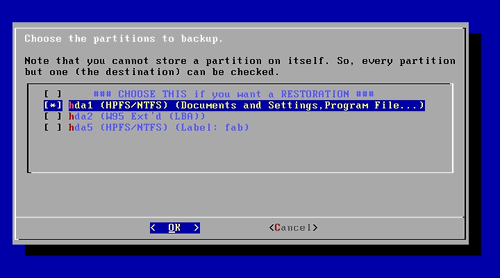
Partimage Is Not Ghost or PING is a bootable utility similar to Ghost that uses Partimage to backup and restore disk partitions. The disk images can be backed up and restored to and from directly attached drives, through your network, or removable media such as CDs, DVDs, and external drives. You can also use PING to backup and restore BIOS settings. If you are new to PING, check out the great how to documentation on their website.
Bart’s Preinstalled Environment
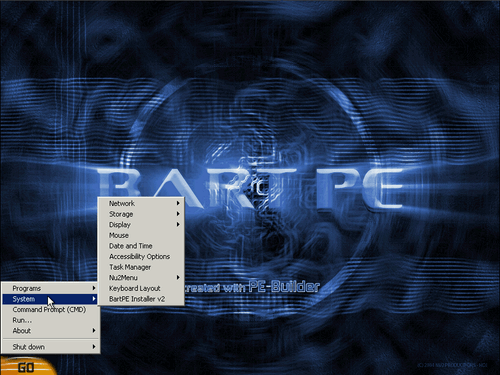
[Update – I’m sorry but Bart’s Preinstalled Environment is no longer operational – Ed.] Bart’s Preinstalled Environment is a utility that allows you to build bootable Windows CDs. It’s a great way to restore files, run virus scans, and so on when you can’t boot into your Windows installation. There are also lots of additional tools that you can install when creating the CD to aid you in troubleshooting a computer. And since it doesn’t rely on files located on the hard drive, you can even boot into computers with no OS installed to perform burn in tests.
GParted LiveCD
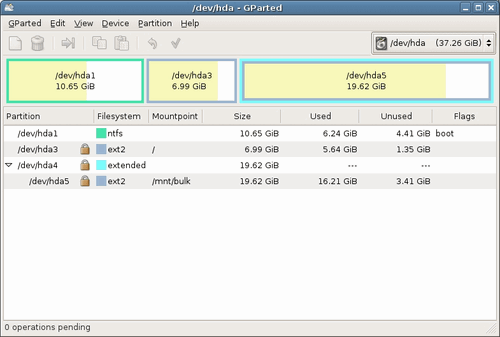
GParted is the partition editor that is used by the Gnome linux desktop environment but has been made to work from a bootable CD. It is similar to Partition Magic in that it allows you to change disk partitions while preserving the partition’s contents. It supports ext2, ext3, fat16, fat32, ntfs, hfs, hfs+, linux-swap, reiserfs, reiser4, ufs, and xfs.
Windows Ultimate Boot CD
Ultimate Boot CD for Windows
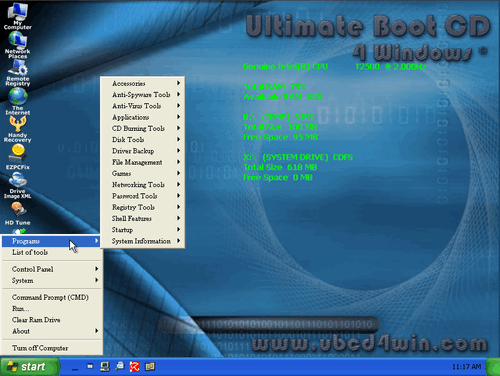
The Ultimate Boot CD for Windows was originally created out of a desire for a Windows version of the original Ultimate Boot CD. Three and a half years later, the project is still going strong. The UBCD for Windows is like Bart’s Preinstalled Environment, which it actually uses during the creation process, in that it allows you to build a bootable Windows CD. But what sets it apart are its many great tools that can run directly from the CD. Not only are there many great repair tools, but there are also applications like Firefox and PDF Reader that allow you to use the it for more than just troubleshooting computers.
Darik’s Boot and Nuke
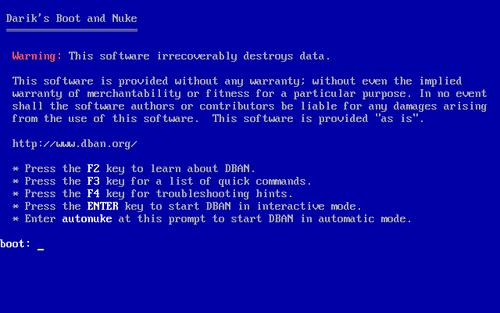
Darik’s Boot and Nuke allows you to effectively wipe all data from hard disks making it unrecoverable by forensics analysis. Just boot from the CD and perform a quick erase or choose between 6 different options including the Department of Defense 7 pass and even the Gutmann 35 pass wipe.
SystemRescueCD
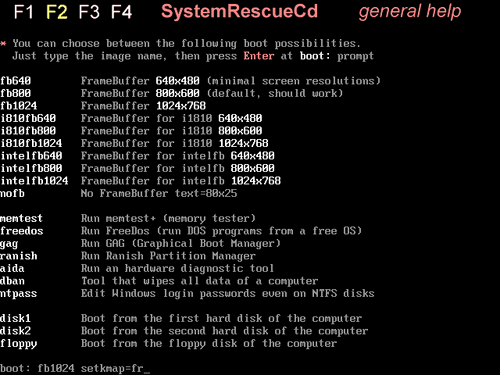
SystemRescueCD is a bootable repair utility that is great for recovering data after a hard drive crash. It comes loaded with many system utilities such as Test-disk, Partimage, sfdisk, and many other file system tools. It can also be used to partition and image your hard drive.

Offline NT Password & Registry Editor
Offline NT Password & Registry Editor allows you to boot from a CD to reset forgotten Windows passwords. You can also use it to unlock locked or disabled user accounts and edit the registry.
Knoppix Linux Live CD

Knoppix is one of the original and best bootable live CDs available. Not only can it be used as full-fledged bootable desktop with programs such as OpenOffice, GIMP, Firefox and more but it can also be used as a rescue utility. There are two editions available. With the help of compression, the CD edition can hold up to 2GB and has more than 1000 software packages. The DVD edition can hold up to 8GB and has more than 2600 software packages.
Ophcrack LiveCD
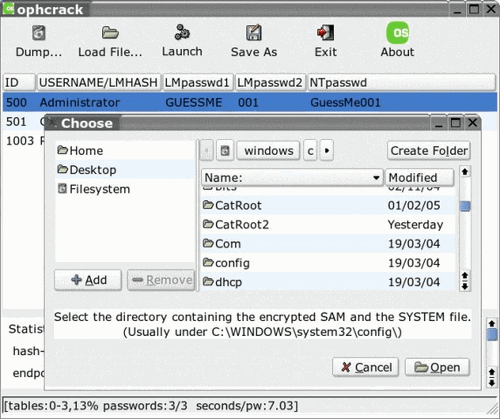
Ophcrack LiveCD is a bootable version of Ophcrack, a Windows password cracker. Ophcrack can be used to recover lost passwords. It is also safer to use than Offline NT Password & Registry Editor but isn’t always successful.
Helix Live CD
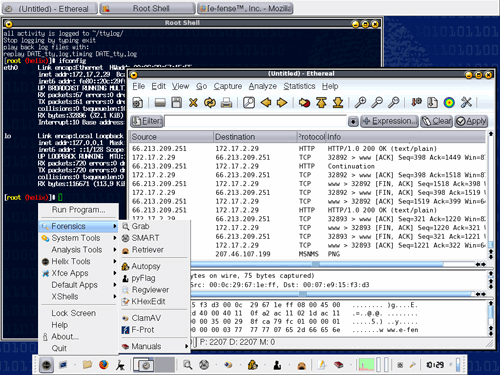
Helix is a Live CD that is built upon Knoppix. It comes packed with tools focused on incident response and computer forensics. It can be used to copy files, detect and recover deleted files, retrieve hidden data, detect viruses, find rootkits, and much more. Certain tools on the CD can also be used in a Windows environment.
Summary of 10 Great Tech Tools that Boot From CD
So there you have it. Probably the most popular is Windows Ultimate Boot CD. Then again tools to recover password (forgotten Windows password recovery or otherwise) are also always in need and you can be very popular with this in your bootable CD tools. I’m curious to see which bootable utilities you recommend.

51 Comments
Anonymous
February 4, 2008Microsoft has designed a constrictive box that is full of DRM, licensing restrictions, and controls over you, your machines, your data.
Try thinking “outside the Microsoft Box”!
Get the LiveCDrom and boot it in the CD, then use it’s tools to browse your system, clean the drive(s), or, heaven forbid, install Linux as a dual boot system, with it’s 20+ thousand free games, applications, suites!
http://simplymepis.com is one fine choice for very fast 32 or 64bit processors.
erealMedia-com
December 23, 2008Great list of very useful tools….. surely these tools help computer technicians life easy. Knoppix I have used many time, it is simply great. I love since first time I saw it- booting complete OS from CD-that was simply great!
Murali
January 28, 2009I’m new to bloggong & My blog is about basics of Software Testing,Manual Testing,SDLC,Testing Techniques,Levels of Testing,Types of Testing,Test Planning,Test Execution,Test Development,Bug Tracking,Result Analysis,Test Design Techniques and QTP. so I write about that which I know.Give it a visit if you get a chance..
feel to free to visit:http://softwaretesting-guide.blogspot.com/
Regards,
Murali
Aziz
December 6, 2012hi Murli,
Aziz here, i just want to know that sftwr tstng is good field or not?
As i am a IT technical engg now i want to move in to sftwre tstng or Web devlopment i don’t know wht to choose….
can u tell me which 1 is better.
Regards,
Aziz
09738213015
Jens
May 20, 2009Great list so far. RIP (Rescue is possible) should not be missed in your list. It’s another recovery and troubleshooting Live CD. http://www.tux.org/pub/people/kent-robotti/looplinux/rip/
linky1124
July 10, 2009the 11th tool is http://www.resetwindowspassword.com/
Matt
August 25, 2009To the Anon. who said that PartImage is better than GPArted.. Bull puckey… GParted has full HFS+ support with the newest version. I know for a fact, as I just used the latest image to work with my MacBook..
Joe Butler
December 7, 2009Knoppix has saved me many times over!
Joe Butler
December 7, 2009forgot to add my web link!
coco
December 21, 2009I recommend a new tool windows password reset 7.0 . It also support windows 7 password reset. And it’s the best tool i ever seen. I’m sure it is helpful for those who locked out of computer.
coco
December 22, 2009I recommend a new tool windows password reset 7.0 . It also support windows 7 password reset. And it’s the best tool i ever seen. I’m sure it is helpful for those who locked out of computer. Learn more about it, please visit http://www.resetwindowspassword.com/
happykaka
December 23, 2009A few days ago, I had met the headache things that I had forgotten Windows login password. The login screen rejected my passwords. I was frustrated because there was very important data on my disk and I couldn’t reinstall the OS. …………. However, I fortunately got to know the Windows Password Unlocker, which is a professional windows password recovery tool for us to reset windows 7 password [broken link replaced] instantly yet no data loss.
happykaka
December 23, 2009I used Windows Password Unlocker to reset the Vista password. Windows Password Unlocker is a professional Windows password recovery tool for those who have lost or forgot Windows passwords including Windows Vista password, Windows 7 password recovery…
Chris
January 27, 2010I found a tool which can reset windows password boot from a CD too.
http://www.windowsloginrecovery.com
adxkvf
February 26, 2010Also can use the tool to burn a reset cd disk for bypass windows password http://www.anypasswordrecovery.com/.
adxkvf
February 26, 2010You can use the windows password recovery tool “Any Windows Password Recovery 3.0 ” to help bypass windows password http://www.anypasswordrecovery.com/ ,it need not to reformat or reinstall windows OS,then with no data losing.Its safe.
Zach
March 11, 2010I think the best method to recover windows password is using windows password recovery software. Burn the .iso file to a blank CD or a USB flash drive or a floppy disk, insert the CD(USB/floppy disk) into the problem computer and your password will be reset to “Blank” without losing any data and you needn’t reinstall windows OS.
HackThePlanet
July 13, 2010Also check out BackTrack4 – it’s a linux security testing tool. You can use it to figure out just how long it takes to crack your WEP/WPA/2 wifi password (cough cough – or somebody elses – cough cough). It now has support to use your video card processor in order to bruteforce WPA/2’s, it’s a little bit disturbing how quickly these passwords can be cracked.
Tony
August 4, 2010I have locked out of my computer for a while,and have tried everything i could do but failed.Until I found this great tool – Reset Windows Password 1.3 boot CD as recommend.
Richard
August 23, 2010I always trust Windows Key Finder boot CD, which helps to remove the lost or forgotten password with no data loss. Moreover, it can recover lost product keys from crashed or unbootable computer.
mark
October 29, 2010http://www.windowspasswordrecovery.net
mark
October 29, 2010I have downloaded windows password Recovery Basic. It is a very quick and useful utility for recovering passwords. Just an easy to use bootable CD/DVD . It can also be used on a USB Flash Drive. http://www.windowspasswordrecovery.net/
Lynet
November 16, 2010Download a bootable CD–Windows Password Key 8.0 to remove the admin password.
Ben
November 18, 2010The best solution I found was to use the Winlogon Password Reset(link below), it got me in seamlessly and there were absolutely no problems.
http://www.windows-logon-password.com/
Karel
November 21, 2010I usually use the Windows Password Reset Kit 1.5 to reset Windows password, It worked great for me, with no reinstall and no data loss.
http://www.reset-windows-password.net/
Fridget
November 29, 2010All those stuff you mention is included on “Hirens v12” it is loaded with technician tools like harddrive data recovery,partition,clonning,windows login password reset for admin and users account and many more…
Chearl
January 19, 2011Windows Password Key
Saved me today. After many hours of installing and tweaking a brand new PC, something went wrong. I was not able to log into the only Administrator account I had, once the machine had been rebooted.
I burned Windows Password Key to usb, followed the onscreen prompts and in a few minutes was back in the machine.
What a lifesaver!
It will become a permanent part of my toolset for fixing Winndows password problems.
Ariel
January 30, 2011A few days ago, I had met the headache things that I had forgotten Windows login password. The login screen rejected my passwords. I was frustrated because there was very important data on my disk and I couldn’t reinstall the OS. ………….
However, I fortunately got to know the Windows Password Resetter 1.7, which is a professional windows password recovery tool for us to reset windows 7 password instantly yet no data loss.
http://www.resetlostpassword.com
password recovery
February 9, 2011It’s very easy and safe to reset the forgotten windows password.
You need to prepare:
1:A blank CD/DVD or USB flash drive
2.A computer which can link to internet
3.A program called Windows Password Recovery 6.0
Get started with this 3 simple steps:
Website: http://lost-password.net/products/windowspasswordrecoery.html
Step 1 – Download windows password recovery utility and install it.
Step 2 -Burn your Windows Password Reset CD:
To burn your CD, you’ll need a blank CD-R and the .ISO file of Windows Password Reset.
Step 3 – Put in your newly created CD and remove your Windows password.
Hope it helps.
johnjilinkin
February 16, 2011SMARTKEY Password Recovery Bundle is a must-have toolkit to recover/remove/reset passwords for Windows, Excel, Word, Access, PowerPoint, Outlook, Outlook Express, PDF, RAR/WinRAR, ZIP/WinZIP, MSN, AOL, Google Talk, Paltalk, Trillian, Miranda, Opera, Firefox and IE Browser, etc. Over 21 types of passwords can be Recovered instantly. Until now, these password recovery tools are the fastest on the market, the easiest to use and the least expensive.
http://www.google.com.hk/search?q=www.lost-password.net%2Fproducts%2Fpasswordrecovery.html&btnG=%E6%90%9C%E7%B4%A2&hl=zh-CN&source=hp&aq=f&aqi=&aql=&oq=
bily
March 17, 2011I am a design director in a design company.Many of the designs are stored in my computer.In order to ensure the security of the computer, I have always change my windows password.For this reason, I sometimes forget my computer password.
At this time, colleagues and friends would give me a lot of views.ALICE tell me to use the administrator account in safe mode without password, but the computer still prompt for password.BILY suggested me look into the SAM file,and delete it.but it not a good ways.
At last,A friend recommended me to use Windows Password Buster Professional(the url is:http://www.password-buster.com),which a very simple, practical windows password recovery tool.Resetting windows password with it can save lots of time for me.I no longer have to worry about forgetting windows password.
If one day you forget your windows password, and you want to use the shortest time to solve it, you can try this software.
bily
March 17, 2011I am a design director in a design company.Many of the designs are stored in my computer.In order to ensure the security of the computer, I have always change my windows password.For this reason, I sometimes forget my computer password.
At this time, colleagues and friends would give me a lot of views.ALICE tell me to use the administrator account in safe mode without password, but the computer still prompt for password.BILY suggested me look into the SAM file,and delete it.but it not a good ways.
At last,A friend recommended me to use Windows Password Buster Professional(the url is:http://www.password-buster.com),which a very simple, practical windows password recovery tool.Resetting windows password with it can save lots of time for me.I no longer have to worry about forgetting windows password.
If one day you forget your windows password, and you want to use the shortest time to solve it, you can try this software.
windows password
April 12, 2011great! thanks,it is useful to me.
Kon-BOOT
July 7, 2011Kon-Boot Rocks btw I love your list
Anddy_2011
August 17, 2011A few days ago , I was confronted with the password problem.
Finally , my workmate James introduce the Windows password
Seeker.It help me access windows successfully. It’s official
site: http://www.passwordseeker.com
Bob
December 8, 2011Last month, I lost my windows vista administrator password. I solved my problem with the help of the Reset Windows Password 1.7.
It not only supports Windows Vista, I have personally tested it with Windows 7.
It worked perfectly to reset any local user account to a blank password. Just an easy to use bootable CD/DVD.
You can download it from: http://www.top-password.com/reset-windows-password.html
bob
December 10, 2011I know a simple way to reset windows password to blank when you forgot windows administrator password,it need not to reinstall windows OS,and wont loss any data, by using “Reset Windows Password 1.7”.
You could get the windows password recovery tool from the reference link:
http://www.top-password.com/reset-windows-password.html
JD
December 22, 2011Would you quit spamming the password recovery software, the crap don’t work anyway.
syonxu
February 8, 2012Remove/reset lost Windows password you can use Windows Password Rescuer, it can reset/remove Windows 7/vista/xp/2008/2003/2000 password instantly.
I highly recommend [Daos Password Recovery Bundle 2012].[Daos Password Recovery Bundle 2012] is an all-in-one password recovery software, which recover password for Windows, Excel, Word, Access, PowerPoint, Outlook, RAR/WinRAR, ZIP/WinZIP, PDF etc. Over 70+ types of passwords can be recovered instantly.
jackymark
March 28, 2012I just want to say that WIndows password is not safe, some tools can remove it easily such as Windows Password Rescuer.
But you can just use it to recover your lost/forgot password.You also can use Windows Password Rescuer to add a new user with administrator privilege to your Windows when you can not find target user. With this New user account you can logon your locked computer directly to copy important data from the locked computer if you want to reinstall your Windows system at last.
How to remove Windows 7 password?
How to bypass Windows 7 password?
Windows 7 Password Recvery.
jackymark
April 2, 2012To recover Windows Server 2000/2003/2008 domain administrator/user password, follow four steps below:
step 1. Use Windows Passowrd Rescuer to create a Windows password recovery disk.
step 2. Set the locked computer to boot from CD/DVD-ROM or USB drive.
step 3. Boot the locked computer from Windows password recovery disk.
step 4. Reset Windows 2008/2003/2000/XP/VISTA/WIN7 local or domain password.
Windows domain password recovery
Pinke
July 30, 2012Thanks to whomever created this freakin awesome informational application. Things of this nature really have taught me a lot. But that does bring up a question or two or three. 1. Does anyone have an app, resource, any idea on where to find fully functional downloads for kern
kernels and android OS and cdma codes for any and phones….it would be great for someone to make an app that contained all of that information…lol…when I finalize my first app it will be of that nature…and more…it will be free for everyone who wants to know how to completely modify their android…without worrying about getting some corrupted file some where…..because there will be other things more important like NOT bricking their phone….
Zhouwei608
May 25, 2013Windows relogin tool is the eleventh.
John
September 4, 2015SystemRescueCD has DBAN, Partimage, Offline NT Registry & Password Editor, and GParted included on the CD. This makes 4 of your choices redundant, and yes it had all these in 2008 when you wrote the article. I’ve sworn by it since 2003, and it has never let me down. It’s even better now, of course.
Korence
September 22, 2015Hello, guys. Thanks for your such nice post. Windows Password Key is a much powerful tool for Windows lost or forgotten password reset. I have use it to reset forgotten Windows 10 password successfully in last week.
http://www.lostwindowspassword.com
Seif Eddine Slimene
October 19, 2016Hello, you just forgot Hiren’s BootCD!
dharmv
December 9, 2016you can reset windows password with active @ …..no need to worry aboout forgotten password again..
Leave A Response