Find How to Recover Deleted Files from Recycle Bin After Empty!
In the following article we cover how to recover deleted files from an emptied recycle bin. I show you some tools and the steps to take that can help you recover your files after you have emptied your recycle bin. I have some great links to closely related subjects too.
[This article has nearly 7 thousand shares on Facebook alone, and we last updated December 2021 – Ed.]
So, you’ve emptied your recycle bin and then realized that you’ve deleted a file that you still need. If you act fast enough, you may be able to recover the files before the computer overwrites them with something else. It is not so much you need to act quick, but rather act carefully before you use your computer for other tasks that can cause permanent loss of your files.
Read on below for how to restore deleted files and for recycle bin recovery steps even when emptied.
You can click to jump to the most relevant section for you, including for Mac OSX (the fifth in-page jump).
Missing Recycle Bin
Recover Deleted Files
Recover Files Deleted from Recycle Bin after empty (Restoration)
How to Recover Permanently Deleted Files (Recuva)
How to Recover Files Deleted from Trash or recycle bin after empty on Mac
Missing Recycle Bin?
If your problem is not that the files are gone from your recycle bin, but rather your recycle bin is missing or appears to have been deleted, then this is a different problem and there is another article to help you. Click Here for ‘Recycle bin recovery‘ which covers this in detail.
Also see this guide if you just want learn how to recover your files from the recycle bin.
Okay, now on with this article.
Introduction
You are not alone; recovering lost files is a big industry. If you’re asking ‘can I recover or restore my data files deleted from my recycle bin?‘ then this article is for you.
I’m going to help you get your files back in this article and at no cost or low cost, if it is possible, so don’t worry.
As a computer tech it’s my job to remind you of one thing you likely already know is true:
I know you’ll groan but can I please just remind you to backup your computer every so often.
If you do, then recovering deleted files from an emptied recycle bin might not be a problem for you next time!
A good option is to have a second separate drive just for this purpose. You can read about our recommended options here.
Please decide today to get an external drive (or memory storage of your choice) and automate a backup of your files!
Alternative way to recover files when your recycle bin is empty
A good alternative to the software methods below is to use ‘File History’, which works if you have a recent version of Windows and if you have already set it up prior to losing data.
See this article to recover deleted files using File History.
This doesn’t require any third party software, so is ideal, with one big ‘if’.
As stated above the important point is IF you have already configured File History in Windows.
Get this – Start a good back up process!
For the general user, I’d advise to get an external hard drive of similar size that does the backup properly for you. Much easier than copying and pasting the files you hope are the recent ones, and avoids a lot of duplication.
I suggest the “Seagate Backup” models if you want it to do the backup management for you.
I last bought a 4 Tb drive because it was a few years ago that my digital photos and videos quickly took up more space than they used to! Next one will likely be three times bigger or more!
(The recommendations for back up external hard drives immediately below are affiliate links, you don’t have to use them but if you do and make a qualifying purchase within a day, we might qualify for a commission, which won’t affect your purchase price.)
See these HDD Drives with either backup or data recovery service:
Seagate Portable 2TB External Hard Drive (around sixty bucks).
If you have a lot of videos, try the Seagate Backup Plus 5TB Portable External Hard Drive, (good medium capacity) with much bigger storage capacity.
The largest capacity we’ve seen in this range, is this incredible 18TB External HDD!
I own and like Seagate drives, but no, I’m not sponsored by them!
Recover Deleted Files
If you have simply deleted files and want to recover them, then you can restore them from the recycle bin.
Go to the recycle bin and see if your files are there.
If so, then click to select them and click the recover button.
Note: There are a few things to be careful of so that you do not make matters worse.
We have a clear article which shows you how to restore deleted files step by step (with screen copies to make it so easy to follow and avoid the hazards).
See how to recover deleted files from the recycle bin in Windows 10.
For most people, to recover recently deleted files, this is what you need.
If you cannot find deleted files in the recycle bin using the above article, then they may have been deleted from the recycle bin.
You’ll need to read on below to see how to recover files deleted from recycle bin.
I am not affiliated with any of the software provided below, these are the preferred options used by the author!
Recover Files Deleted from the Recycle Bin
One of my favorite quick recovery tools to recover files deleted from the recycle bin is called Restoration.
It’s a stand-alone Windows based file recovery program that allows you to restore deleted files even after they have been emptied from the recycle bin.
Restoration requires no install and because of this, you can put it on your flash drive and take it with you wherever you go.
Here is exactly how to use it step by step.
Step 1: Download free Deleted file Recovery Software
Download Restoration (not an affiliate link) onto a drive other than the one that you want to recover files from. This is the first software program to try.
WARNING: There is an important reason not to write the downloaded drive to the same one you want to recover files from; if you write any more data to the same drive, the hidden but not-yet deleted files might be over-written and lose your data for ever!
I know sometimes you may be wary to download free software, but in this case I have done it for countless clients.
Perhaps you are worried about a recommendation for third party software (ie. nothing to do with you or me), but I reconfirm I have used it.
Also I reconfirm I receive nothing from them for the recommendation.
Step 2: Run Restoration and choose the drive to scan
Run Restoration. If you are using Windows 7 or Windows 8 then you may have to right-click Restoration and choose “Run as Administrator”. Next, choose the drive you wish to scan.
If you know the file name or at least part of it, type it into the “All or part of the file” box. If you don’t then just leave it blank.
You can check the box “Include used clusters by other files” but if this applies to the file you are trying to recover then it will probably be corrupt.
I’d try without the first time, then if you don’t have luck it could be worth a try with this setting in a second run.
You can now click “Search Deleted Files”.
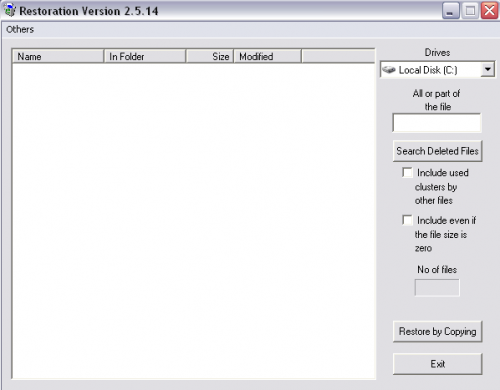
Run Restoration and select the drive (top right) to recover deleted files on that drive. This is the latest version of Restoration, v2.5.14 (for 2020).
Step 3: Scan through the list to find the file that you would like to restore
When it is finished scanning you, can search through the file list to find the file that you would like to restore.
Once you find it, highlight it and click “Restore by Copying“.
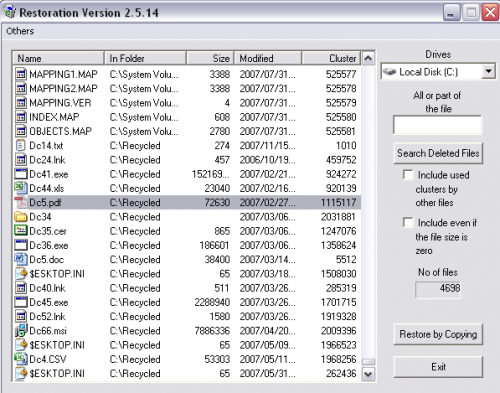
See ‘Restore by Copying’ button near lower right hand side.
Step 4: Save your file (preferably to a different drive)
You will now be asked where to save the file. If you try to save it to the same drive you are scanning you will be asked if you would like to select a different drive so you don’t overwrite the original data.
Once you have finished restoring the file you should be able to open it.
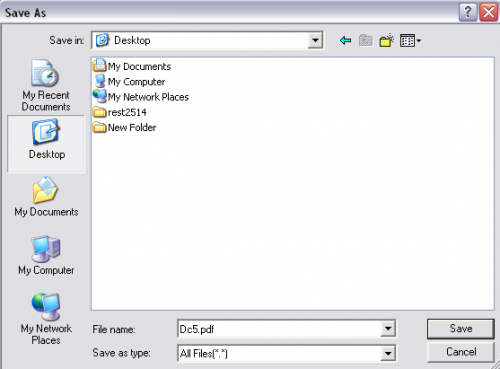
Save your recovered ‘permanently’ deleted files. This is where it can be handy to have an external drive so you don’t risk overwriting data.
Alternative method on how to recover files deleted from emptied recycle bin
If Restoration can’t do the job then the next tool I recommend using is Recuva.
Just like Resoration, Recuva is a free utility that let’s you undelete files after you have emptied your recycle bin. Why might you use it?
It has different scanning methods than Restoration including a “deep scan” feature to use when the standard scans aren’t working.
Here is how to use it.
Step 1: Download free Recycle bin recovery software
Download Recuva (not affiliate link) onto a drive other than the one that you want to recover files from. Again it is important to avoid using the same drive to avoid over-writing the downloaded file over the top of hidden file data.
Step 2: Run the software and select file recovery type
Run Recuva. You will be presented with a wizard to ask you what type of file you want to recover.
If you aren’t sure then just choose “All Files”.
This will take somewhat longer.
However, you won’t know just what you can recover so it is probably the best option.
It might mean a longer nervous wait I’m afraid!
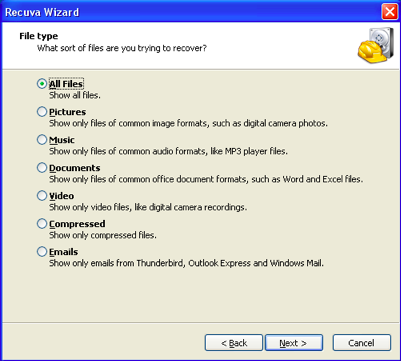
Step 3: Select from the recycle bin option
Next you will be asked where the files are located.
If these files were deleted from the recycle bin then choose “In the Recycle Bin”.
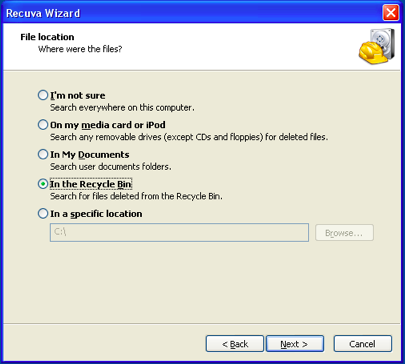
Step 4: Start the scan
You are now ready to start your scan.
This is also where you can choose to Enable Deep Scan if Recuva is having trouble finding the file.
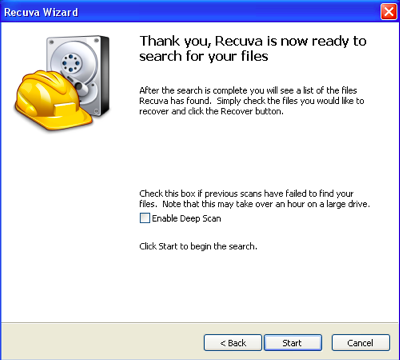
Step 5: Choose the file you wish to recover
Once the scan has finished, you can now choose the file you wish to recover.
Select the file and click the “Recover” button.
Choose a location that is not on the drive you are trying to recover from, otherwise, you may overwrite your file.
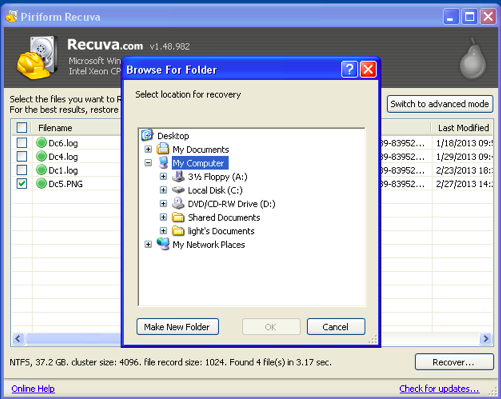
This screenshot shows recovering data using Recuva version 1.48.982 whereas if you download now, there is a slightly more recent version.
Hopefully, after using these file recovery utilities, you now have your files back.
When you delete a file, Windows flags that space as usable free space again.
Therefore, there is always the possibility that Windows has already overwritten the deleted file with something else. If this is the case then Restoration or Recuva will not be able to recover your file or your recovered file will be corrupt.
So the faster you act from the time you delete a file, the greater your chances are of recovering it will be.
While you are at it:
Now I hope you implement a better back up plan.
We have a lot of information about data recovery and recovery of deleted files on TheTechMentor.com.
We aim to supply helpful information for both MS Windows and Apple Mac OSX systems.
That seems like a great segue (segway) to deleted file recovery for Mac Computers. So, now on to the free and (semi-) free methods, for Mac computers.
Note: the article below is for how to recover deleted files from recycle bin after empty for your Mac (i.e. how to recover files no longer in your Mac’s trash or recycle bin if you find it is empty).
Alternative semi-free method on how to restore deleted files from recycle bin for Mac computers
I know you probably would prefer to know how to recover emptied trash on Mac.
In some cases people prefer to recover files without software (without additional software). I appreciate the desire, it seems everyone wants to get you download their software. You want to avoid the risk of addition undesired software or viruses.
This one though is worth it. It has been around for years and works just fine. You need not be concerned.
If you are using a Mac, then I recommend using the MiniTool Mac Data Recovery utility (not affiliate link).
Why do I call it a semi-free method to restore deleted files on a Mac? It will restore files for free up to 1GB.
If the deleted files are larger than that then you will need to pay for the full version.
Use the link above to download it.
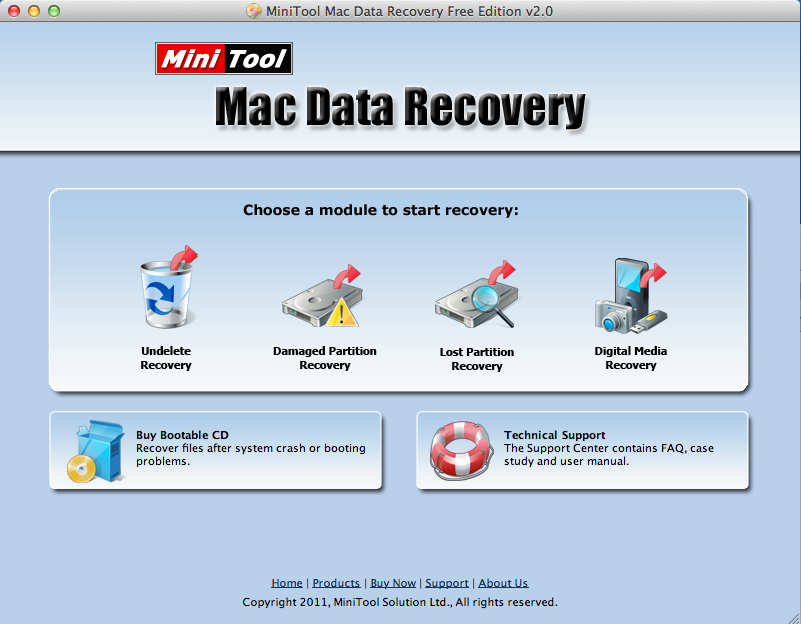
Recover deleted files deleted from trash using MiniTool’s Mac Data Recovery.
For more in-depth information on file recovery software and methods to recover from serious issues, check out How to Recover Data from a Crashed Hard Drive.
Your experiences
Please share your experience with Restoration, Recuva, or MiniTool software for emptied recycle bin recovery.
You can comment on software proposed within this article, or any other file recovery programs that have helped you retrieve deleted files.
Conclusion
Recovering files deleted from the recycle bin is possible in a number of ways. Which you chose may depend on your situation. You can recover deleted files from the recycle bin if you have simply deleted your files and need to get your files back. When you have emptied the recycle bin and you want to recover deleted files in Windows or Mac, it is possible.
You will need to use some data recovery software and the ones I show how to use above are free for most purposes!

52 Comments
Anonymous
January 3, 2008Thanks for the info on the “Restoration” download. Is there anything similar for the Mac?
http://www.itdoescompute.com
AppleCXC
January 13, 2017RePicvid Free Data Recovery is also another best bet to recover deleted files from emptied recycle bin or trashcan ( on Windows or Mac computer/laptop). Just have a try!
Anonymous
March 6, 2008As far as I know data recovery tool Handy Recovery (http://www.handyrecovery.com) supports Mac file system (HFS)…
don
January 9, 2011i hav complaint that its restores the files but im unable to preview the images
Casey
January 15, 2011Hi Don,
That’s because your files are corrupt, not because of an issue with the program.
izzat klate
March 26, 2013that right
Agus Pribadi
February 8, 2011This search program doesn’t work in my computer ….. why?
doomed
April 8, 2011it keeps telling me that in order to use it I need to be logged in as an Administrator….I AM logged in as an Administrator on my computer….
loin
October 17, 2011most of the file i restore never works
Angel
November 16, 2011I have the same problem, @doomed. I am logged in as Administrator on my own computer but to no avail can I get it to work. Could someone give us help with our problem?
Anonymous
April 9, 2013Just run as administrator if your using windows 7
Steve
November 21, 2011Re Doomed/Angel – I had the same issue. Took a bit of Googling but instead of double-clicking to run the program, you right click and choose ‘run as administrator’
Bee
August 14, 2013@Steve thanks! I had the same problem and your comment helped me!
The Dude
February 19, 2012Failed to restore ANY of the files I selected – two days after deletion with minimal usage.
Lloyd
April 12, 2012I can see that this is a very useful tool. I recently deleted a lot of important files in a folder, and could find all the individual files with this program and the sub-folders but couldn’t find the main folder itself. And because i can’t select multiple files to be restored (by holding the SHIFT key or using any other method), I am forced to press restore multiple times for each sub-folder and each file that wasn’t in a sub-folder.
Simple functionality which allows a user to select multiple files/folders would make this program a lot better.
Thanks
syedawaniyariaz
March 17, 2013after clicking on search for deleted files it says please log on account with administrator privilege and then run the program again plzzzzzz tell me what should i do……….
icah
March 23, 2013i have the same problem like doomed and angel. it keeps on telling me to register as an administrator first >.<
Chris
March 23, 2013Click right click on the program, and then click Run as Administrator and VUALA!!
ramya
May 19, 2013my daughter deleted my photos 1 year back can i get it back? if it does reply me
ramya
May 19, 2013sorry for the mistake before 1 year she deleted can anyone help me? its all my baby photos collection from first month
vickey
May 26, 2013this is a very good software to restore deleted files bcoz i got my file which was deleted before 5 years. thank u lot………………………..
vishal patidar
June 5, 2013Thanks sir
Nick
July 20, 2013They are saying log in to administrator privilege and run the program again..why ?
Mustafa
July 28, 2013May we can have our old files again..but cant return to past of the life and we are doing many mistakes on the way so we have careful more because there is no any programme to bring back the time yet 😉
Rabiya
August 12, 2013after restoring files, they doesn’t work
Matthew
August 14, 2013So i have installed this program but it is only searching the Local Disk C. I believe i actually had the file saved on the desktop and thought it was a shortcut so i deleted it on the desktop anyway to search the desktop since it wont find it on the Local Disk C?
recycle bin data recovery
November 7, 2013thanks. take note that once files are overwritten, they are not recoverable.
eric
November 20, 2013thanks for sharing. Personally I never used the tools in the article, for me, I used this one: http://goo.gl/IxQqg
Eshaan
June 8, 2014its not restoring all the files!
Google
June 28, 2014This is because this device assures to either benefit or cure the autistic people in more ways than one.
Based on their experience, they could know how much is required before going into details.
And then on March 20, the world’s largest paid private blog network – BMR – announced that
its vast network had been almost entirely de-indexed by Google, causing chaos in the internet
marketing industries.
ahmed
July 1, 2014how can we retore windos xp to acertain day without restore point ??
angel234
July 8, 2014Data recovery tool is available to recover data so use this tool for quick recovery. http://www.en.windowsdatarecovery.net/
matt
September 5, 2014Best information available over the internet. Impressed with information provided in your website. But am little inclined to my Hard Drive Recovery software which am using as of now. It saved me from big crisis when I lost entire data from hard drive
Kordell Stewart
September 5, 2014Actually after deleting files from Recycle bin, data still resides on the same drive. You can recover them by means of Remo Recover utility.
Manuel Carrero
December 5, 2014If you have windows vista o 7 professional there is a feature called previous versions which are copies of files and folders that Windows automatically saves as part of a restore point. Previous versions are also referred to as shadow copies. Just right click on the folder that the file used to be and select restore previous versions.
Dane
February 18, 2015After a smooth download and install, when I (Win 7, laptop) ran Restoration there was a pop-up saying i needed to connect to the internet. If I X’d it to close, it just kept coming back.
Not sure why I should need to connect when my local drive is the problem. Maybe it’s harmless, but I don’t like to take chances when there is no logical reason. If I was attempting a recovery from remote (cloud, etc.) storage it would make sense, but not in this case.
Casey
February 18, 2015Hi Dane,
Restoration will never ask to connect to the internet so you must have downloaded the wrong app. Did you get it from this page? http://www.snapfiles.com/get/restoration.html
khan
March 6, 2015oh my god that was amazing thank you…!
kenneth
May 5, 2015i have recovered my files but i cant use them couse htey have changed names how do i turn them back too normal ?
Jerry
May 10, 2015This doesn’t work for me at all!
Only the folders are gettin recycled but what about the files inside em?
I tried to recycle movies and nothin worked. I can’t live with those empty folders. Can someone please give me something else to catch up?
Marco
June 29, 2015I succesfully recover it from recuva but when i open it like the .docx file it says that .docx cant be opened because there are problwm with content..please help me ..thanks
ShirleyC190
July 21, 2015If you have emptied the Recycle Bin to free some disk space, it will be impossible to restore deleted files unless you got a Windows deleted files recovery program. Because when you delete a file and then empty your recycle bin (and even the Windows help menu will tell you that “Deleting an item from the Recycle Bin permanently removes it from your computer.”), the file contents will not be immediately destroyed. Windows just simply marks the hard drive space as being available for use by changing one character in the file table so that the file entry won’t be displayed in My Computer or a commandline DIR command, etc. That gives a last chance to repair and recover deleted files with a data recovery tool.You can download a free version of H-Data Recovery Master.
http://efilerecovery.info/solution-to-recover-both-folders-and-files-deleted-or-emptied-from-recycle-bin/
Bill
August 24, 2015Tried to install with “Run as Administrator” and got a “Product configuration is missing.” error. Tried on both USB drive and hard drive. Suggestions?
Rogue
October 6, 2015I know this is a bit old, but all I’m getting are shortcuts to files
Kalindra Kumar
March 2, 2016Really it work. I used Recuva.
Thanks!
ChickenDrumstickSxLord123456789
June 13, 2016Recuva is amazing thank you so much Casey1!!!!
Mohammad Shahabuddin
July 31, 2016When I boot my laptop it show” check cable connection”, and restart over and over again.
I checked hard drive and RAM problem remain same
Please some help how do I recover my data.
Tech info
September 25, 2016I use Recuva. Thanks for share this info!
lloyd irvin
February 12, 2017Recuva is the best free recovery software. As a Data recovery company, We tried all free and paid software. We normally suggest Recuva, if anyone want to try a free tool.
Giovanie Valencia
December 16, 2017Wow this worked amazing and saved me to recover some very important documents! Thanks alot man your a genius!!!
Allie Cai
January 17, 2018Recuva is the best free recovery software. Wondershare is the best-paid recovery software:https://datarecovery.wondershare.com/
david_flynn
September 5, 2019Fucosoft Data Recovery, The best data recovery software to recover deleted, formatted, or lost data from PC, laptop or removable devices with a high recovery rate.
https://www.fucosoft.com/data-recovery.html
Leave A Response