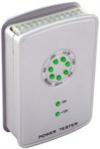
 After getting tired of taking power supplies into our local tech shop to be tested, I purchased the Nspire Power Tester Plus. It is very cheap, easy to use, and gets the job done quickly. With it, you can test 20Pin or 24Pin Power Supply Connectors, P4 Power Connectors, Molex Connectors, and Floppy Power Connectors. This is also one of the few testers for this price that has the ability to test S-ATA Power Connectors. Although this walkthrough is specifically for the Nspire Power Tester Plus, I’m sure that the following information can also be applied to other power supply testers as well.
Testing is started by plugging the 20Pin or 24Pin Power Supply Connector into the top of the power supply tester and then plugging in the power to the power supply.
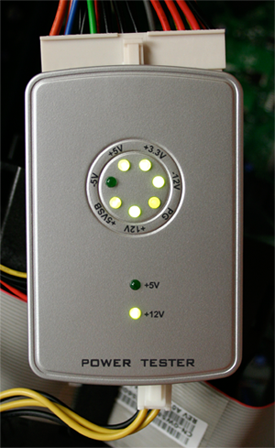
As you will see from the picture above, the Nspire Power Tester Plus has 9 green LEDs that are used to indicate test results. The seven in the middle are used strictly for the 20Pin or 24Pin Power Supply Connector. The bottom two (+5V and +12V) are used for the P4 Power Connector, Molex Power Connector, Floppy Power Connector, and S-ATA Power Connector. In this picture, I am testing a 24Pin Power Supply Connector with a P4 Power Connector. All of the LEDs in the middle except for the -5V are on which means that the 24Pin Power Supply Connector is good. If you are testing an ATX power supply that follows version 1.3 specifications or above, the -5V LED will not come on. This is because in version 1.3 and above, guidance for -5V was removed because it was used in support of older ISA cards which are rarely used anymore. You will also notice that only the +12V LED is displaying for the P4 Power Connector. This also indicates that the P4 Connector is good.
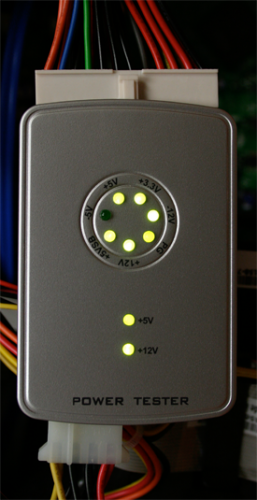
In the above test, I am testing a Molex Power Connector. You will notice that both the +5V and +12V LEDs are on. This indicates that the Molex Connector is good. The same test results should display when also testing the Floppy Power Connector and S-ATA Power Connector or you have a bad connector.
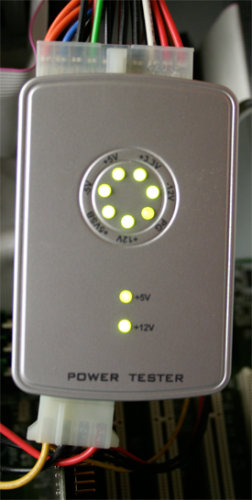
In the above test, I am testing a 20Pin Power Supply Connector that is older than version 1.3 specifications and a Molex Power Connector. You will notice that all of the middle and bottom LEDs are on. This indicates that the 20Pin Power Supply Connector along with the Molex Power Connector is good.
All in all this is a fairly basic tester that gets the job done quickly. If you are interested in purchasing one of these testers and can’t find one at your local tech shop, a simple Google search for “NSP-201SE” will turn up with many different vendors. Also, if you have experience with other power supply testers please feel free to share.

4 Comments
Anonymous
November 27, 2007this looks really usefull. A shame that it is only available in the US and Canada.
After searching several pages of suppliers I could find none willing to ship to the UK.
jimmyt
tron478
December 8, 2007I would like to know where to get on of these testers I am interested in getting one and how much they cost
Leave A Response