Or… How to Fix a Clicking Hard Drive!
Do you have a hard drive that won’t boot and you are suspicious that you can hear a clicking noise? In the industry, we call this the hard drive click of death and the hard drive clicking noise usually means the drive has experienced a physical failure, sometimes even catastrophic. So that hard drive clicking is likely to be serious.
There still may be hope however. If you hear a hard drive clicking noise, take prompt action to recover as much data as you can. In some cases you can use this little trick to retrieve your files.
Just follow these simple steps below.
Could putting a Clicking Hard Drive in a Freezer Really Work?
Yes! This is one method that may allow you to recover files on your own, and it is free! Although I can’t make guarantees in your case.
This does not apply to solid state drives, but I expect it would work with all hard disk drive brands, for example Seagate and WD (Western Digital).
There may be proactive actions you can take with a clicking hard drive in particular. For example with a hard drive not working just some of the time (that is a serious warning sign though).
- If your drive is clicking abnormally, and it is still working I suggest you take it seriously and copy all the contents to another drive – a clicking hard drive may be near the end of it’s life, even if new.
- If your drive was clicking but now has stopped working, the method below might help you recover the data quickly and at no cost.
Is it worth the risk? Option 2
“Your choice to use this method (Option 1) or pay for a professional data recovery service should be based on how important the data is to you and whether you have the money to pay for data recovery.”
To get an idea of how much professional hard drive data recovery can cost, see this analysis.
Warning! There are risks to using the method described below. In the very many comments below you will find some people positively support the practice and have done it themselves, and you will also find other professionals who warn that it could further damage your drive and make it harder (and more expensive) to recover the data professionally later if you decide to go down that path.
Option 3
There is a third option, and that is to simply put it off.
Huh?!
You can wait until a later time before you embark on the recovery of hard drive issues. Provided you do not use the drive! Well, having written that, there can be some deterioration in the drive depending on the issue over time.
Later you may have found:
- The data doesn’t matter that much anymore and you can get by without it.
- In time you may think this method is worth a try.
- Later you may have better financial means to pay for professional recovery.
I (and several people I know) have had success doing this, so no it is not an old wives’ tale. Yes it is strange but it can sometimes work!
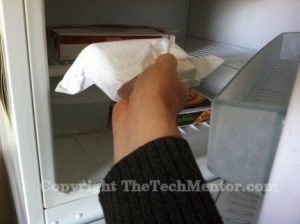
Putting hard drive in freezer
My brother-in-law and I were able to recover my mum’s hard drive data by putting it in the freezer and using it for a short while, to copy any data across that we could at that moment.
Then we put it in the freezer again, and yes you guessed it, recovered further data. We cycled her drive in the freezer that way until we had recovered everything we could. Do you really think we would risk her data – on the hard drive of our own mother?
Well, we sort of took an educated risk.
She felt the data was not recoverable, and yet we thought it was somewhat important to her. So it important to us to try this method.
There were some mitigating factors, like the body of the drive being sound and not damaged.
But we are professionals, and we have done it with success before.
I can hear the screams of the nay-sayers…
Let’s go into the background in some detail before you rush ahead.
Knowledge is power and that is what we at TheTechMentor.com aim to provide.Only you can decide if this is something you want to try. We provide other options so you can make an educated choice.
However if you are ready to start scroll on down to the steps further below.
What are the symptoms?
A hard drive clicking noise is typical; sometimes the hard drive clicks then stops. It might not boot or only boot occasionally.
What causes the hard drive clicking noise?
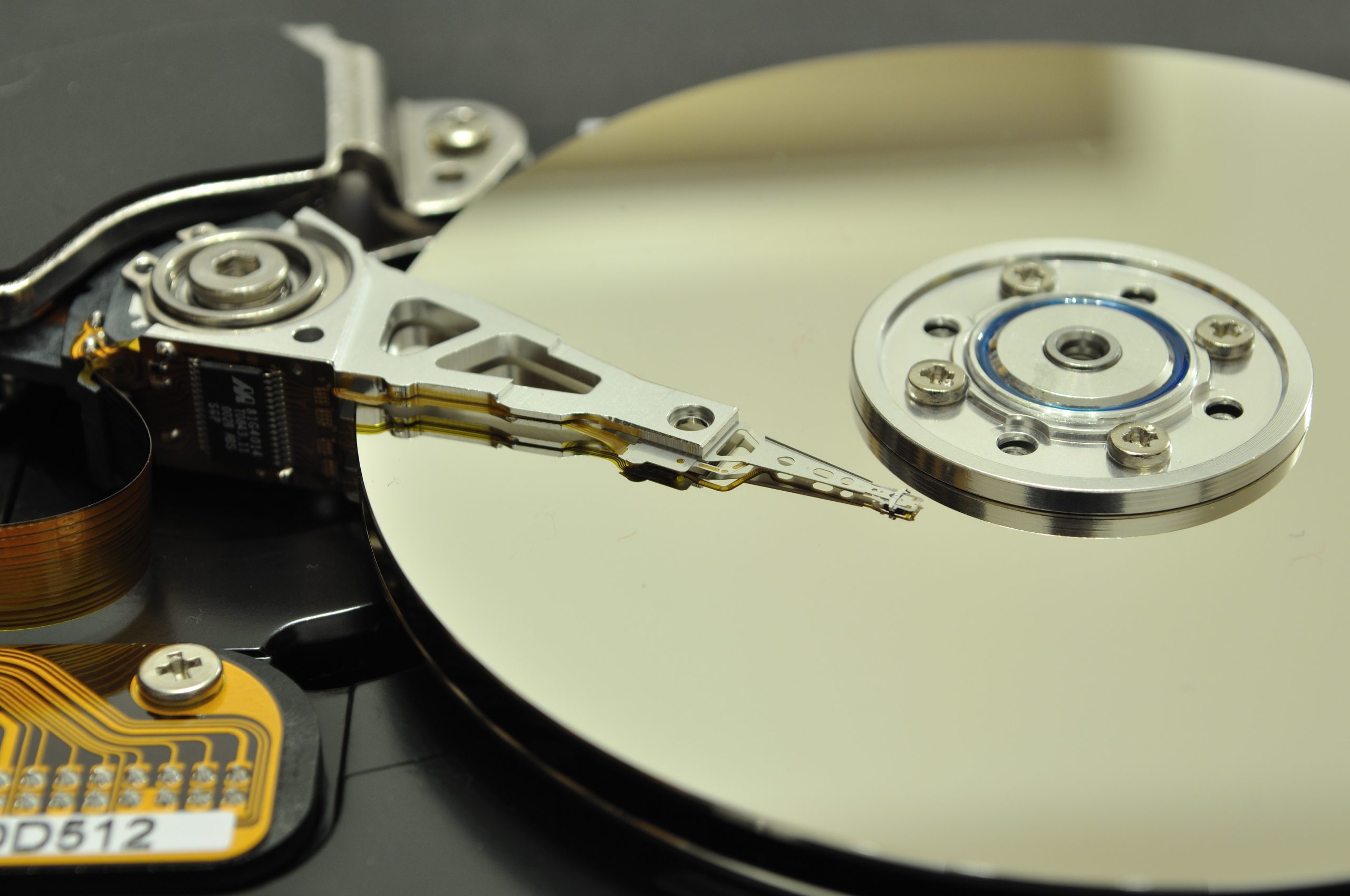
You may know that hard drives work in somewhat similar way to a needle and vinyl record, although it is writing and reading via a magnetic field with much more advanced technology. The reading head typically jumps into and out from different positions across the disk.
This behavior is unlike with a needle and record where the needle simply follows along in grooves or tracks. Also unlike with a needle and record, with a modern hard drive the reading head and disk should never touch.
The hard drive clicking noise is possibly due to impact of the reading head arm or reading head against a hard disk surface or side of the hard disks as it attempts to move into position.
The image above shows the arm with the reading head on the end, and the disk(s) which spin at very high speeds (if operational).
Needless to say it sounds like (pardon the pun) the HDD clicking is critical and you need to take care immediately from this point.
A clicking hard drive if working in all likelihood will not be clicking for long – the clicking noise suggests impact between the head, arm, and/or disk and potential damage at each moment.
That’s why it might not be working for long!
The idea is that an overheated and slightly warped disk and other components may shrink when cooled in the freezer, and sufficiently to for a period of time briefly function.
Use extreme caution, and if the data is at all important, your best bet may be to spend the money and go with a professional data recovery service.
Why might it fix a clicking hard drive if you put it in the freezer?
The word ‘fix’ suggests total recovery to allow ongoing permanent use, but we mean it here as a temporary recovery of operation.
What we’re really hoping for is temporary operation for long enough to recover your data.
Hard disk drive disks and reading heads have incredibly small tolerance (very fine gap between them – they do not normally touch).
To put the hard drive in the freezer will naturally cool the plates and reading head arms.
Cooling the hard drive unit will cause shrinkage in the metal disks and arms inside to a very small degree (pardon the pun!), and it might be sufficient to reduce any warping.
Thus it gives a chance that the physical interference (causing that knocking or abrasion and resulting in the clicking noise) to be avoided while it remains cool.
WARNING: Act to get the data while you still can.
Exactly what action should you take as a clicking hard drive fix?
If the drive is still working, immediately copy all your data or back it up. Otherwise you can try this method to put your hard drive in freezer or cold refrigerator (but only after reading all this article first!).
The explanation as to why is further below and warnings above.
This could be a cheap fix and that is what TheTechMentor.com likes to share: methods that save you money.
An alternative action may be to send your drive to a professional hard drive recovery service. Be warned these can cost hundreds of dollars as in the referenced article, but the chances of success are very high.
Note: As stated above, this does not work on solid state drives.
SSDs have no moving components, and so should not ever make a clicking noise.
Here’s How to Recover Data from a Clicking Hard Drive by Putting it in the Freezer:
Here is the hard drive click of death fix:
Step 1: Remove the drive from the computer
The first thing you want to do is remove the drive from the computer by opening the case. Of course you don’t need to do this if you have a sealed external drive.
Step 2: Cover to Protect the Drive Before you put it in the Freezer
We don’t want to make things worse. Put the hard drive in a sealed plastic bag to avoid bulk condensation. I normally put it in a second larger bag.
I suppose you could use silica gel and put it along with the drive in the bag if you have some (for example from a shoe box from a recent shoe purchase). An alternative may be uncooked rice.
Step 3: Cool by Putting Hard Drive in Freezer!
Then when it is all nicely sealed, put hard drive in freezer and leave it for several hours, maybe even overnight. Give plenty of time to completely and uniformly cool down to the freezer temperature.
Step 4: Remove Drive from Freezer and connect it to a computer
Next, pull the drive out of the freezer and hook it up to a computer. If this works, you should be able to copy the files off immediately.
Act quickly though because you may only have a few minutes to retrieve your files before the drive starts failing again.

Sabrent USB 3.0 to SATA I/II/III External Hard Drive Docking Station
If it is for an external drive clicking noise fix, then it is designed to connect via its own USB. Otherwise, a great option to do this is to use a cable or stand that enables you to connect it to a computer very quickly, rather than try to install it back in the original case. That option could take more time allowing the drive to warm up more. Speed is of the essence.
The best way to do this is to buy and use a USB adapter/connector. For example, a USB to IDE/SATA adapter.
This is the cheapest multi-functional USB 3 option and I prefer USB 3 because it is faster.
The highest rated option is a docking station, which come in single or dual bay.
Inateck Al USB 3 Hard Drive Docking Station (click for more)
I like the dual bay docking station for the added functionality of copying direct from one drive to another.
You could order one today and have it delivered while you prepare the drive for the freezer.
Lucky you read this whole article before you started now, isn’t it?!
So what if you can’t get all of the data off in one go – does it end there? Well fortunately it has been found that it is possible to repeat the process.
Again, I can offer no guarantees.
Step 5: Repeat Cooling the Hard Drive in Freezer Again
If you didn’t get all the data off the drive the first time, the drive may have warmed back up. You can repeat the above steps again. Disconnect it again, then seal it in the bag(s), putting it in the freezer again to cool it, remove and reconnect it and try to operate it all over again.
Repeat as many times as necessary or stop if it no longer works.
Caution: If you are not a pro, consider to use this method if this is a last ditch effort to recover data from a drive. If you think you may send the drive off to a data recovery service, please don’t move forward with this method.
Although I write this just to be sure, because I have successfully recovered data by other methods after this freezer procedure did not work one time.
For some alternatives, please check out my more extensive hard drive recovery guide with step by step instructions in How to Recover Data from a Crashed Hard Drive.
Since there is a common thread in some of the comments below, I am placing a later edit here:
If your drive is working not clicking or buzzing or beeping, and your computer doesn’t recognize your drive, then please do try the options in the above link.
If software also doesn’t help, then I still have quite high confidence that a professional recovery company can help.
One highly professional company I recommend in the above link is now included here to make it easier for you: Visit Gillware.com (click to open in another tab).
I note that Gilware recommend not to put your hard drive in the freezer! It is fair to say, they do not believe in the core solution presented in this article!
There are likely to be other professional data recovery companies you can find near you. If you found a good one you can recommend, please put it in a comment below to help others.
If you have had any experience with a hard drive click of death fix feel free to post about it below.
Conclusion: How to Fix a Hard Drive Clicking Noise
Yes I know putting the clicking hard drive in a freezer sounds crazy and, believe me, I thought it was until I actually saw it work the first time. Now that I’ve explained that the cooling effect can help improve the tolerances of warped and interfering mechanical parts, you can understand why it might work. You can also understand why it might be further damaging to use a clicking hard drive (after the freezer or not). I have heard some reports of this fixing the problem all together, however, that seems to be rare.
You might not want to risk storing any important data on a drive that had been clicking, even if the hard drive clicking has ceased. The hard drive click of death sounds scary and you shouldn’t wait for things to get worse. Yes it is true, you might be able to perform your own hard drive clicking noise fix, even if only temporarily, by putting it in the freezer!

268 Comments
Josh
September 11, 2006I am a computer repair technician for a major movie studio and have been fixing computers for over 10 years and I can say that this is the first time I have ever heard of this type of “repair”. However I could see it working, at least in the short term but I seriously doubt it would actually repair the drive for any lenght of time beyond data backup. If this works for you immediately backup your data. DON’T EXPECT THIS TO FIX YOUR DRIVE PERMANTLY OR AT ALL AND REGULARLY BACK UP YOUR DATA, IF YOU DO YOU WONT HAVE TO WORRY! Also I would double or triple bag the drive if you try this because you really don’t want moisture in around or on the drive at all.
Paul
May 19, 2010Freezing your hard drive was a major fix for the old IBM deskstar drives, they had a high failure rate with the platter warping in the heat causing the heads to hit the platter making the clicking noise.
by freezing the disk you make the platter less ‘warped’ giving you a chance to read the disk before it begins to warp from the heat.
Chuck
November 4, 2010I have used this several times and it does allow you to get the data off the drive.. I have done it and some of the techs I have told this to have had it work.
Joey
September 10, 2011Does it have to stay in the Freezer for 24 hours or can it be less time??????
Chuck
September 10, 2011Anywhere from 2 hrs or longer depending on how long you actually want it to spin and get data off of it.
jared johnston
June 30, 2013It can be less
jam
February 15, 2011my harddrive 500g will not let me save anything from my logic or computer e.g pictures. everytime i try to back things up it says error code , so i have allot of things to back up , but i can take things off of it and copy them to the computer but will not let me back up random ly 3 weeks ago
any help?
Megan
February 18, 2013Good to see that those movie studios will just give anyone a job, these days.
Brandon
December 19, 2013This is a ridiculous statement. why? do you say that because he’s never heard of this “Trick” I’m not saying it wont ever work but this more often than not will do exactly the opposite the drives weren’t meant to sit in those kinds of temperatures. I don’t care how many bags you put it in there will absolutely be moisture in the air inside the first bag no matter what you do. That condensation will be frozen to the platters inside the drive and if you fire it up right after taking it out this frozen condensation will likely ruin the read write heads and cause damage to the platters themselves when the read write heads impact the ice it will push down on the platters destroying your data.
Cautious
March 1, 2014And apparently this website will allow just anyone to post an uninformed retort. The head disk assembly of a modern disk drive is hermetically sealed. There is no exchange of air with the outside environment — ironically, to prevent exactly the sort of problem that poor Brandon is insisting CAN happen. It can’t. There will be moisture in the bag. It will condense on the casing, even on the logic board; but it won’t get anywhere near the platters, or the heads. And, distilled water isn’t conductive enough to cause problems in small amounts. Lots of people have used this technique; sometimes it works, sometimes it doesn’t, but not because of heads crashing into ice formations on the platters. That just doesn’t happen. Try it; don’t try it; it’s up to you. Squeeze as much air as possible out of the bag before you seal and and you’ll be fine.
Shaun
May 24, 2014/Dear Cautious. The PC board or if you never noticed the circuit board is external. Therefore sealing will safeguard the electronics.
Shaun Murfin
Mitch
April 4, 2015You are not even remotely correct. Most hard drives do have a way to circulate air. That is why most drives have the “do not cover” warning on the label.
This site does a great job of describing why freezing a hard drive is useless. It also has a video showing the formation of frost on the metal discs inside the drive.
http://acsdata.com/hard-drive-freezer-trick/
Jeannine Callon Jones
July 13, 2013Haven’t tried this yet but will. Lost pictures from trip to Switzerland is all I really care about. My daughter had an iPod that quit and we froze it and it’s still working 4 years later.
suraj pote
March 5, 2014hello sir,
im electronics student,can you help me about computer trouble shooting solutions.
i hope u will help me.
pleas reply me ,
surajpote68@gmail.com
thank you.
shabbir harianawala
April 4, 2014here I would like to recommend you guys to tighten all the screws of your hardisks which are below the seal of warranty. only if the hardisk is out of warranty. it worked for me!
amit
April 23, 2014hello sir can u help me.
i have 1 tb seagate external hard drive.i think its corrupt.when i click on it it hang the system and could not open.i also use some recovery software but it show nothing in drive.some time is also not detect in system.can u helep me how can i back my data.?
Shaun
May 24, 2014I have tried my crashed Hard drive in the freezer for 2 hours. worked for about 4 minutes then crashed. /I am going to try a cooler box, six pack/ (Beer) size with dry ice. “frozen Co2. I will keep the hard drive in the sealed package with cables connected and sealed with what we in South africa call press stick or tacky tape. I am going to extend the cables to my laptop and run from there. I will revert with results. Dry ice or frozen Co2 is -109.3°F or -78.5°C. /It is readily available at outlets for long term freezing of overland goods or ice cream. /T/he hard drive should stay cold for a few days with this method. I will let you know.
vaibhav jadhav
June 19, 2014my wd my password external hardisk is not connected to a laptop and not also showing in disk management.. if any one know how to solve it give me a steps..!!
my important data is in harddisk.. and how to recover it.. help me!!
Steve
September 25, 2015I author this site here http://www.harddrivebeeping.com and I can tell you without a shadow of a doubt putting a hard drive in a freezer is very reckless and you have a high probability of permanently damaging your hard drive, losing your data forever. This is not a good idea, although it may have worked for a few people, I would not follow the herd if your data is important.
Gabriel
January 11, 2017Before you proceed any further I’d like to let you know that any DIY data recovery attempt can cause permanent data loss. If you’re in need of a reliable data recovery service I’d strongly recommend Ultra Data Recovery as they do the same jobs as the “big corporations” (such as heads and platters replacement), but actually affordable: http://www.ultradatarecovery.com
Casey
September 11, 2006Yes I agree Josh that no one should rely on this to fix the problem permanently. I would just recommend using it long enough to backup your data and restore it to another drive. I did, however, read another article where a guy said his drive was still going strong a year later after doing this. I probably wouldn’t trust it though.
John
September 16, 2006I have used this technique for many years to recover data from dead drives. If you have a failing electronic component, it may work fine when cold, but dies once heated. If it’s a mechanical problem, cooling down the drive will allow the lubrication in the mechanisms to thicken giving a few minutes of usage to recover data before failure. I had one drive that was so bad once that I had to hose it down with the liquid refrigent from cans of compressed air every 30-40 seconds. I have since relocated my small fridge in my lab next to my test bench with a external USB enclosure in the freezer portion. This is a disaster recovery technique and will not fix a problem with the drive. So once you get the drive operational, get all the data off that you can before it fails again.
Joe Sans
April 5, 2013John… Let me tell you a little secret I use in a DoD Forensic lab… I use a 10G fish tank… Fill with Mineral Oil, a Computer Liquid Cooling System and I keep the Fish Tank inside a regular large beer cooler surround by dry ice!!!!…. Works like a champ and allowed me 5 to 10 minutes with a hard drive before it fails again…
Joe Sans
April 5, 2013I forgot to tell you… Submerge the HD in the tank… Mineral Oil is not conductive nor corrosive!!!
Debbie
July 10, 2013Wow, that is brilliant, Joe! Thanks for the tip!
Doug
September 17, 2006Good idea John with moving the fridge to the test bench. I can also say that I have seen this technique work. As said above, always back up your data so that you don’t have to worry about failing hard drives.
Phil
September 18, 2006This is also the same for microsoft xbox hard drive failures. My friend’s xbox died on him and I can’t remember if he called microsoft or if he found it on a wesbite. But it temporarily fixed it so he could get his saved information off of it. So it does work, just temporarily.
Josh
September 20, 2006I started using this technique a few years ago when working as a desktop technician for an automotive parts manufacturer. We would often receive laptop from our general managers that would no longer boot (toshiba satellite series). Once we determined that the drive wasn’t spinning, we would place them in an anti-static bag and then inside 2 ziploc brand freezer bags. Once frozen over night, we took them out and transfered all the data and then ordered new hard drives.
Yves Rubin
September 22, 2006Dry ice?
Thank you for posting this, it sounds like a great trick and makes plenty of sense. Has anyone tried using dry ice instead? The ice does not melt (since it is solid CO2) and should cool the drive to at least -20 to -30 degrees Centigrade, if not lower (the ice itself sublimes at -78 C).
Blake
October 9, 2006I’ve used this process several times. I am always impressed when the drive allows me to pull files from it.
One time when it did not work, I filled a zip lock bag with extremely hot water and placed it on the cold drive. The temperature differential seemed to free the bearings in the drive allowing me to get at the data
Craig
February 5, 2007As one who has worked intimately with designers of HDD’s I can tell you there are may things that may cause this to “work”. In the case of “permanent” recovery, the cause is usually a stuck voice coil (moves the heads). Sometimes a surge will cause the voice coil to move farther than it is supposed to, and temporarily “jam” internally. This is a consideration that is usually accounted for when designing HDD’s, although manufacturing tradeoffs can allow it to occur under extreme circumstances, such as when the drive is very hot & the voice coil is overdriven, because of metal expansion the heads can move to a position they normally wouldn’t, causing a jam. One other mechanical problem might be the circuit board itself. One small bad solder joint when heated enough will lose contact due to heat extension, and when cooled make contact again. The same can be true for a crack in the copper trace layer on the circuit board. These can be almost impossible to trace down having done it for HDD mfgr “autopsies” (they want to know why a drive failed too)
One other strange thing involves the silicon electronics. I have been wokring with solid state devices since 1970, and I never cease to be amazed by a phenomen I occasionally see, whereby “silicon” repairs itself. A shorted transistor will un-short, and then perform normally. Usually this is accomplished by cooling the device. I think that the contraction must re-connect the silicon atoms somehow.!? Sometimes they have been subjected to very high voltages, and cooling them has rarely causd them to work again. I have had components that fail under heat & when I cool them with “Freeze Spray” they recover & wokr normally until they heat up again. In rare instances, they never appear to fail again – very weird
ryan
February 21, 2009I tried the freezer trick with my freeagent external. The first time it didn’t work. The second time I froze it for 2 days, took it out, and was able to transfer one small folder at a time. If I tried to move a big file it started knocking again and I would have to turn it off and turn it back on again. After about 25 minutes it started working perfectly and I was able to transfer large files. I’m now on day two and the drive appears to be permanently fixed. I don’t understand how it works but it does.
Svenja
March 3, 2014Did your hard drive by any chance have the click of death to it?
Sean
March 20, 2007I have a Maxtor that went bad in 6 months. Sounds like the arm is stuck. I am going to try the freezer method, sounds silly but I am ready to try anything to get this thing to work…
Anthony
March 30, 2007I wonder if anyone has ever put the drive in an enclosure and kept it in the freezer or fridge and ran the cables back to their computer? Could this make it run long enough to recover large amounts of data?
Beverly Cownover
March 30, 2007I want everyone to know about my experience with my hard drive. I had seen this posting about freezing the hard drive to get it to work. I had my laptop hard drive crash after a vacation where I had downloaded all vacation pictures and no backed them up. Besides having around 3000 other family pics plus all my family history material. I had sent my hard drive off to have data recovered. They told me $1500.00. I could not afford this sum. I thought what did I have to lose. I would try this method. My hard drive was majorly damaged they said. The first two times of freezing did not work. The third time I froze the hard drive only in two freezer zip lock bags for 20 hours. When I tried it no such luck it still made the horrible clicking noise and would not reboot. It kept telling me to put in the system recover disk. I left it running for awhile hoping that maybe it was too frozen. After about 20-30 minutes, it quit making the clicking noise but was still giving me the intel boot failed messages. I did CTRL ALT DEL the screen went black. Nothering happened and then I thought maybe it went off. I started the computer again and lo and behold I swear it started booting windows xp up. I held my breath and got my external hard drive plugged in and I swear on my childrens lives I got almost two hours of it working. I downloaded 4,484 pictures and anything else I wanted. I was through so I turned it off. I turned it back on and it wouldn’t work again and of course was making the horrible clicking noise. I can’t still believe it but this is the truth. I am so grateful. To me with my family pictures saved, it is a computer miracle. Thank you Thannk you, Thank you.
Andy
April 3, 2007Thank you for the great advice! It worked like a charm! After a hard drive failure, I gave up trying to get my data back and bought a new one. I was ready to toss the old one away, when I read this article. It not only worked long enough to get everything back, it’s still working fine as a second drive. (and I learned to back stuff up more often)
Thanks again.
AC
April 12, 2007I didn’t know how to take the hard-drive out of my laptop, so I just put the entire computer in the freezer over night. I guess I didn’t use enough bags because when I took it out there was condensation all over it. Not wanting to short it out, I let the computer dry out for 48hrs before turning it on. It started up with no problem and it has now been working fine for the last two weeks! Crazy! I have backed-up all my data and was going to toss the laptop, but now I am going to see how much more life I can get out of it. It’s only 7 years old!
mukesh
October 10, 2013My tab was showing internal memory failure,so I put this on deep freezer for 12 to 13 hrs, after this when I try to on it then it became completly dead then I think that it may suffering from cold so to make it warm I put my tab on microwave for 10 mins and after that my tab never’s on ,but now I became a very good cook to prepare masala tab sandwhich.
Rodney Solowenski
November 17, 2013My desktop wouldn’t turn on, so I filled my bathtub, put in the computer, and doused it with 14 bags of 7-11 ice. Three hours later, I took it out and tried to get it to work. It definitely did something, because I could smell it working. But the screen still not showed anything. This technique is baloney! Doesn’t work at all!
William King
December 22, 2014Best comment ever!
Steven
January 24, 2015You could _smell_ it working ??!!
Sounds like you let out the magic smoke.
Bad. Very bad.
Farhan
March 1, 2014Lol
Greg
May 22, 2007I just found out today that my hard drive is dead. I called every data recovery business and as Beverly stated they want 1500 or more. I have very priceless pictures on my hard drive of my children. What is the best type of zip lock bag should I purchase or do I need to buy something more durable
Casey
May 22, 2007A regular zip lock bag should be fine. Just make sure that no moisture can get in.
stone
October 16, 2013dear casey,you says “make sure that no moisture can get in” mean is must in vacuum condition or what?
Sam
June 5, 2007So, I have a Western Digital External HDD that stopped working (something about cyclic redundancy?) while I was trying to transfer a massive amount of data from it to a new external. Now, when I turn it on by plugging it in, it tries to boot, but ends up ramping up, then clicking, slowing back down, ramping up, clicking, etc. again and again…so I promptly unplug it…
Any ideas if this freezer thing will work? I guess it wouldn’t hurt to try…do I need to take out the internal part to freeze or can I put the whole thing in there?
Thanks!
Casey
June 5, 2007Sam,
You will need to put the whole drive in there. Just make sure you put it in a zip lock bag first.
Alex
August 3, 2007I have used the freezer technique twice and was able to recover the data to a working primary drive. I have also tried “Component Cooler” spray also on some drives. I think I’ll try CO2 next and see how that goes.
Ste
August 4, 2007Ok, I have the same clicking (I could use a better word) problem. So tonight ill grab a zip-lock and try it. I’m getting different times to keep it in the freezer though. Any accurate or “safe” times to trial this??
Kevin
August 5, 2007Although this technique works in certain circumstances, there are many cases where it will not. Freezing had gotten a lot of mileage in recent years as a recovery method, but most people that have touted it hve no idea why it works, or when to apply it. Their good luck may be your bad luck if your problem is different than theirs.In 99% of the cases that it works, it is because of the head arm. For those of you that may not know, the heads ride above the surface of the platter at a predetermined distance. When the platter is not spinning, the heads are at rest against the park post, and sitting on the platter. When you power up the drive, the heads and arm do not move away from the park post to 0 sector until the motor is at full speed. This is because the distance between the head and the platter is actually caused by the air currents in the drive. When the platters spin, they obviously create air currents. The inside of the drive, and the aerodynamic design of the arm catch this air current and the air current causes the heads to float at a certain height. If the drive motor slows, or you have a power brown out, the heads can hit the platter, causing a “head crash”. I said all of that so it is easier to understand why freezing works.
If the motor starts to slow from age or whatever, or something happens to the drive that the heads aren’t floating at the right height (too low), they won’t read the sectors properly. When this happens, the drive tries to reset itself by sending the heads back to the park post and then setting out fresh to find 0 sector again. When the heads continue to not find 0 sector, this cycle repeats continuously, and the clicking or knocking you hear is the arm hitting the park post. The clicking itself is not harming anything, although it sounds bad! What the freezing does is increase the distance between the head and surface, re-establishing that gap. It is only in this instance that freezing will work. If the heads have crashed or are dead, which will also cause the clicking because the heads can’t read anymore, freezing will do nothing. If heads are dead, then heads are dead. Here is a little tip to tell if your heads are dead, or if there is still life in them and something else is the problem. Plug the power to the drive without hooking the drive to the computer. Just power. If the clicking starts immediately, either the heads or the controller are dead, and no freezing or anything else will get your data. The only fix for this is a clean room to replace the heads first. If there is a 2 or 3 second or more pause before clicking, or you hear the arm seeking before the clicking, then freeing might help. The problem with freezing is that it is a path of no return. If you freeze the drive and DON’T get what you want, most times the clean room can’t even help you now. So only use freezing as a last resort and when you KNOW the budget doesn’t allow a clean room.
bob
March 15, 2012I accidently plugged my hard drive into a power adapter with 1 less amp. It ran for a minute, and i heard it click. Afterwards, it still worked intermittently and clicked. Did plugging it into the under-amped cord cause it to head crash, or could it have been something else? Would freezing help? (It currently spins for a while, then clicks several times, then gives up).
thanx
Casey
August 6, 2007Hey Ste,
Leaving it in the freezer overnight while you sleep should be sufficient. You could probably get away with leaving it in for a shorter time frame but this is usually how long I leave it in for.
Kevin,
I really appreciate your clarification and insight. It makes a lot of sense.
Mike
August 8, 2007I have not tried freezing a drive yet, but was thinking if putting the drive in a bag and using one of those vacuum sealing machines for food storage would be good to keep moisture from entering?
Rick
August 12, 2007Everyone talks about drive failure I’m wondering what are some of the failures that you guys are having. I get invalid boot disk. Is this something that a freezer might fix for a few minute
Rick
Binary Guardian
August 21, 2007One of my college buddies told me that I should freeze my hard drive to recover data and back it up to a new drive. I looked at him like he was messed up on drugs, but I listened to him and decided to give it a shot. To be completely honest it actually worked. I placed my hard drive next to frozen pizza and chicken nuggets and left it there for 4 hours. Than I used this frozen hard drive as an external drive to recover data from it to my new already installed drive in the computer. I was really excited to see that this trick worked, from now on I tell people to do the same and they look at me as I was tripping on something.
Lillie
August 22, 2007I tried freezing it but all that came up afterwards was ‘invalid boot disk,’ just like before i froze it. Would it work if I froze it and tried again? The only change that occurred was that there was less noise coming from the drive. It used to make screeching noises, and now it does not. If I tried again, would it get better? Please advise. Thanks.
Casey
August 22, 2007Hi Lillie,
Unfortunately, this isn’t a guaranteed fix so if it didn’t work the first time it’s probably not going to work if you try it again. Your only other option might be to send it off to a data recovery service.
Lillie
August 23, 2007Oh, alright, thanks Casey. I hope they can at least fix it for me.
Tcm
September 9, 2007I’m going to try this later today…I have 160 gigs of precious data(family pictures,videos,years old data) on a Samsung SP1614N I cant retrieve(yes I know back up)
Excellent advice above, after spending ages trying all sorts I stumbled across this site.
I will let you know how it goes
Tcm
Tcm
September 10, 2007didnt work…….oh f*ck…….deep frozen it for a go next week when i get back from Russia.
snx
September 12, 2007can someone recommend the best software for recovering data from a crashed harddrive. it is showing up in windows explorer but will not let me access it. I want to try use software before putting it in the freezer.
Claudia Barclay
January 5, 2014The same thing is happening to me with my external 3tb Seagate harddrive. It doesn’t make any noise at all, the blue light lights up when it’s plugged into my laptop via USB. It will show up on my computer but I can’t access my files at all. I have tried every piece of software available for download to try to get my files but nothing will work…. in fact most software just locks up when it’s trying to access the drive.
I wonder if freezing my external hard drive would work…
Can anyone tell me what they think might be causing this since there is no clicking or beeping, no noise at all?? I can hear it spinning in side…
Thanks
Claudia
Ben
September 3, 2014Did you ever figure out what was happening Claudia? My Seagate 3T External Drive is doing the same exact thing. It recognizes the drive but doesn’t show any folders or files… No clicking, sounds like it is trying to access. I did try freezing it and it worked for awhile. The folders showed up and I was able to save 4 of 5 folders but the last folder it wouldn’t read properly. Any suggestions anyone. Thanks!
Casey
September 12, 2007Snx,
Maybe this article will help. http://www.caseytech.com/how-to-recover-data-from-a-crashed-hard-drive/
Casey
Lou Rasmussen
October 13, 2007After a power outage computer would not start.
Bought computer with basic CD rom drive and Xp
Pulled the old hard drive and froze it over night WALLA couldn’t believe it booted when I put in new computer. You are a miracle worker
But now I can’t send files to Cd Rom.works fine reading material on disk but cannot send files to it.
Shows up as F drive. when using SEND TO or SAVE AS ‘says Selected drive not in use. Check disk to make sure disk is inserted is inserted”
I’m elated to have my old files back but now I can’t save them on disks in case it ever happens again
Hope this is not off topic. Greatly appreciate any help
Lou
naisioxerloro
November 28, 2007Hi.
Good design, who make it?
Steve
September 14, 2008Hey! Everyone I told about this idea told me that it was the most ridiculous thing they had ever heard-especially all of my tech loving friends. I tried it because I had nothing to lose, and to my shock and happiness I was able to access my drive and pull about 35 gig of data before it failed again. I couldn’t believe it!!!! All of my friends were amazed. Thanks for the advice.
Steve
September 14, 2008Also, apparently reading more about my drive this failure for no apparent reason is nothing new. From everything I’ve been reading stay away from Western Digital My Books. Any suggestions on a good manufacturer/external?
Casey
September 14, 2008Hi Steve,
Thanks for the comments. I’m surprised that you have been informed to stay away from the Western Digital My Books. We use them at work and haven’t had any issues with them. I especially like the My Books that contain dual hard drives for mirroring. That way, if one fails, your data is still safe on the other. As far as other brands of external hard drives go, I’m not sure.
Kilian
November 24, 2008Hi Folks,
I have 6 WD HDs, and this Summer I put them away in a drawer for about 2 months. When I plugged them in again last week, 2 of them would spin up, click 3 times, spin down and then repeat that cycle. Both drives would then show up in Device Manager, but not in My Computer or Disk Management. Tried changing USB cables, power bricks, uninstalling all USB controllers etc. No luck! I’ll try the freezing thing now, before attempting to plug them directly into my computer case. WD’s response to me on their support line was useless – basically: “Sorry Guy, sounds like you have bad drives. Bring ’em to your local computer expert, maybe he can do something”. WD – bah!
Casey
November 26, 2008Hi Kilian,
So did the freezer trick work for you?
Jon West
January 14, 2009RE-FREEZING THE DRIVE
I needed to recover over 100GB of data from my disk. I used the freezing trick and it worked first time but I only manged to get 10GB of data. I therefore returned the drive to teh freezer to refreeze it. This worked.
I have repeated the process over 10 times now and have continued to get data from the drive. HOWEVER, the drive is gradually getting worse (which I am not fussed about cause it is covered by the warrenty).
Finally – in my experience adding a bag of frozen pees to the top of the drive (make sure it remains in the sealed bag) seems to lengthen the usage of the drive….Happy Days.
Mike_NY
January 17, 2009I’ve got a 160 gig Hitachi Deskstar 7K250 that does seem to get spinning but then it clicks once
and the data light goes off.
My laptop has Xp on it for an operating system.
When you plug the drive into the USB port It starts to see the drive then it pops up a message that there is a problem with the device.
I have been using a known good external HDD case (brand new in fact)
The reason I know the case works is because I have another drive that does work in it.
Its 6 degrees outside (Ya gotta Love New York weather) so I put the Drive in a ziplock bag and opened up my grill and set it on the bun warmer shelf.
I have 50000 or so songs on this drive.. I hope this works.
I will post my results.
I left it out there for 1 hour I’m sorry to say this did not work.
I am going to leave it out there over night to see if that works.
Robert
March 8, 2009My daughters Mac Book, still under warranty, seems to have died, with the whirring noises described in the above postings. All that we want to recover are her photos. Her docs are all archived. When she tries to start the computer all she gets is the flashing “?” mark. It won’t go any further. I don’t know how to remove the hard drive and wonder if i can freeze the entire computer if i seal it properly? Also I wonder if removing her hard drive and reinstalling it will void the warranty diminishing her chances to either get the computer fixed or replaced. Thanks for any advice.
Casey
March 8, 2009Hi Robert,
I’m not sure if just removing your hard drive to recover files off of it would void the warranty or not. Give Apple a call if you want to be certain. If you do want to give it a shot, iFixit.com has a very good tutorial on how to remove a hard drive from a Macbook. http://www.ifixit.com/Guide/Browse/Mac As far as freezing the whole computer goes, I have no experience. However, I don’t think I would even try it because I’m not sure what effects it might have on the LCD screen or the battery. Hope this helps!
-Casey
Mark
March 14, 2009Hi Robert,
I have a macbook sitting in front of me with the exact same problem. Unfortunately the freezing trick in our case didn’t resurrect the drive. I would *not* recommend putting the whole laptop in the freezer. You run the risk of condensation forming on the electronics when you take it out, and likely other than the Hard drive failing the rest of the laptop is fine.
Anyway, good luck!
Mark
RM
March 24, 2009hello ! thank you for the great tip ! It has saved the data from my hard drive. I had a LaCie 250GB external drive which had a mechanical failure and thought I had lost all my files. I put in in the freezer for 24hrs wrapped in 2 Ziploc freezer bags, fired it up and recovered the data. I’ve purchased a WD hard drive since, so I hope it is better, I will definitely be backing up more often. Thanks again – good luck with yours.
kym ashman
April 8, 2009I’m going to try this with my 250gb drive, really hope it works and I’ll let you know….sounds crazy to me though!haha! Going to get the ziplocks tomorrow.
Marcus
April 18, 2009So I’ve just tried this, and ran into a problem immediatly. My computer finds the disk (Im using a swedish version of XP so i dont know all the terms in english) in disk management, but it doesnt show up as a drive when double clicking My Computer. What do I do?
Aaron
April 27, 2009I just bought a hard drive enclosure and saran wrapped it closed after adding the clicking hard drive in it. I then froze it for 2 hours left it is the freezer and punched a hole where the power goes and the usb plug goes. then attached it to my laptop and was able to copy the data from the drive to my laptop. Thanks everyone for helping me out.
pingiscoolest
May 10, 2009I have connected a laptop to my harddrive (in an external enclosure) while it is in the freezer. It looks pretty funny with a usb cable running out of my freezer but it gives me unlimited time to backup important files, kinda like Aaron…
Paul
June 10, 2009I just took my failing WD myBook and, with firewire and power still attached, wrapped it in saran wrap, then paper towels, then saran wrap again and put it in the freezer of my mini-fridge. I’m leaving it in there for a day before i try to fire it up and get my data. Hopefully I can be another cinderella story like some of the earlier posts…
Brian
November 10, 2009Hey Paul,
Did you have any luck with putting your MyBook (with power still connected) in the freezer and then pulling the data off?
I want to try this method too – but is there any danger with having a power cable plugged in to something that’s in the freezer?
Casey
November 10, 2009Hi Brian,
I think Paul was talking about putting the actual hard drive (not the whole computer) in the freezer while the hard drive was attached using a firewire cable. I would not recommend putting the whole laptop in the freezer as this could cause serious problems to the LCD screen, battery, and other components. See Robert’s question on March 8th as well as our replies.
Casey
November 10, 2009Sorry about that, I misread your comment. I’ve never tried this method and don’t know if there is any danger to this or not. Maybe Paul will be able to give us some insight.
Paul
November 10, 2009Hey Fellas,
Worked like a charm! I took my myBook (the external hard drive) with the power and firewire cables plugged in to the hard drive but not the outlet or computer and wrapped it very very very heavily in plastic wrap and paper towel.
My base layer was paper towel and then I alternated heavy layers of plastic wrap with a layer of paper towel. The goal here was that the paper towel would absorb any moisture that tried to sneak in. I was also very careful to seal the wires with electrical tape so that no moisture could sneak though. Then I left things in my freezer over night.
The next morning, I just plugged things in. I had about 30 minutes of usage. Then back to normal. I was able to get into a routine of a few hours in the freezer to about 30 minutes of usage until I got almost all of my 300gb of files back. I was even able to unwrap the old HD after I was done to send it back to western digital for my refund.
So go for it, and good luck.
Paul
Brian
November 10, 2009Thanks for all the info Paul and Casey – and everyone else, I’ll give it a shot.
Brian
Casey
November 10, 2009Yes, thanks for the reply Paul. Very helpful!
John
June 14, 2009Hard drive making noise, getting to windows progress bar on vista but bar keeps going across and not getting any further. used pre boot diag software and getting error code ‘biohd-8’ and the hard drive fails the test, as well as clicking sound ever 2 – 4 seconds. hard drive in 3 freezer seal bags for last hour. will leave it there for 12 hours.
Theo
July 10, 2009able to scan for a problem they get the (Not Responding) thing at the top and will not close till I unplug my external drive. This same thing would happen to the external itself if I try to access any folder on it. The hard drive makes no odd sounds and spins as usual. I have asked if this could be some type of virus and all the times I asked people told me no it’s not one. One thing I know I did before it stopped working was leaving it sitting on top of my laptop over night. I am not sure if the heat could have messed it up or not but I have done this many times before. I would really need to know if anybody has had this same issue and I would need to know if the freezing trick could help or need to know if it could hurt anything.
Brad Tremaroli
July 30, 2009I was completely skeptical. I thought this was a joke. I had visions of trying this and looking like a fool. I can NOT believe this worked. This saved my ass… literally. 15 years of assets, gone, now saved. Thank you to the guy who figured this out… you are my hero.
Dave
August 3, 2009I got a seagate 500gb sata drive in February and the other day my pc just stopped working. using an older WD 160gb ide i can get my pc going again but the computer wont recognize the sata drive, i have also tried this with a sata drive as well. in the bios it detects the 500gb drive but windows doesnt. i have used PC Inspector File Recovery and to no such luck it did not find the drive either. the drive seems to spin up but does nothing after that. will this work or does anyone have any other recommendations?
brendan
August 13, 2009i have a sony vaio vgn-fs630/w. it will start up windows and then freeze (but sometimes respondsive) and sit there making a click click sound every 2 seconds. its deffinitly from the hard drive. does anyone think this might help or have any othere idea of what to do? thanks. any help appriciated
superb88
September 2, 2009I’ve a external maxtor basic 1tb for only 6mths and have nearly 700gbs of data on it, recently it made the clicking sound lk every 5 secs and it is totally undetectable, i would like to try the freezing technique but i wonder should i place the entire harddisk with its casing in the freezer? or I must remove the casing and leave only the harddisk itself? Removing the case seems like a bad option as it totally void the warranty, so i have no chance for exchanging it after that…
so, is it ok if i do as mentioned but only thing is to place my entire harddisk with its casing in the freezer? will it work as well?
Casey
September 2, 2009Hi Superb88,
You should be able to just leave it in the casing as long as the hard drive itself can still get cold. Hope it works!
-Casey
superb88
September 6, 2009thx casey, i tried the trick, leave it in my freezer for 12hrs, didn’t work unfortunately, hard disk still clicks away…and remain entirely undetectable
Casey
September 6, 2009Sorry to hear that. Unfortunately, it sounds like you’ll be forced to send it off to a data recovery service. Although they can be pricey, they usually have a pretty good success rate in cases like this.
Eric
September 26, 2009superb88 were you able to recover your data, it sounds like I have a similar situation.
EM Grand
October 1, 2009So I have a Macbook, with a hard drive failure. Called Apple support and after they scolded me about not backing up my data the guy mentioned that he himself has placed his hard drive in the freezer and been able to retrieve data. When I asked him how, he clarified that he could not recommend this as a solution, and that removing my hard drive would likely void my warranty. But he again repeated, that he has known that this freezing thing works. He suggested 3rd party software – Disk Warrior, which I bought and did not work. I think he was trying to throw me a lifeline with the freezer tip, without losing his job. Is it more or less or just a likely to work or not with a Mac versus a Pc based hard drive?
Casey
October 2, 2009Macs and PCs both use the same type of hard drive, they are just formatted differently. So this technique will work just as well with a Mac formatted hard drive as it does with a PC formatted hard drive.
Brian
November 10, 2009I’m having the same problem with my 3 year old WD MyBook 500gb external drive – the clicking noise, and then not working afterwards. I’ll try the freezer idea tonight/tomorrow.
But I was wondering: is there any danger if i plug the power cable (and the usb cable – but not worried about the usb part) into the drive while the drive is still in the freezern and then hook it up to my laptop? Someone mentioned doing it that way above, and it makes sense, since most people are saying that as the drive warms up, it’ll stop working again. So sounds like the best thing would be if you could keep the drive in a “frozen” state while pulling all my data off.
Any thoughts/suggestions?
Thanks a TON for this freezer idea people, i wrote all my data off when i heard the dreaded clicking – but now i’m very optimistic again!
Casey
November 10, 2009Sorry about that, I misread your comment. I’ve never tried this method and don’t know if there is any danger to this or not. Maybe Paul will be able to give us some insight.
GB
November 28, 2009I’m always hearing of this trick working. My brother’s ipod classic 3g started having hard-drive failure. I knew it was HD failure because I was able to hear the hard drive trying to go on and off, and it just kept restarting itself. Anyways I took the HD out of the ipod, and stuck it in the freezer over night, and the next morning everyone was amazed that it worked. Whats more amazing, I did it 3 months ago… and no more problems at all.
Recently my hard drive started messing around, and I was getting “Disk read error occured” and I couldn’t boot up my PC at all. I stuck it in the freezer, and now it’s been going for a week. Still no problems.
How I think this works is the reading head gets worn away, and loose after some use. I noticed that I could always boot up my computer in the morning. So the freezer might be shrinking what was stretched out over time.
rouel
January 5, 2010my problem on my hard drive maybe different but its always a good thing to ask. well, i partitioned my 4 year old hard drive into 3 equal sizes and installed mac extended journaled. they were working fine until i have to move 70 GB of files to my Macbook. It froze on me so i force quit and restart the computer. i open it again and it saying that i have to back up my files and reformat my hard drive. But then 1 of the partition is still showing up and every time i copy from it, it will take forever and doesn’t do anything. pretty much freeze my computer. so i tried right now im trying the freezing way and we will see whats gonna happen.
if theres any other way out there, appreciate it for any help.
rouel
January 6, 2010so i yeah.. i tried this method and it didnt work for me… i left it there for at least 24 hrs and still just one partition is showing uo and it doesnt copy anything on that partition. So, im guessing that im one of the unlucky person to try this experiment. is there any other way how to recover harddrive failures especially a mac extended (journaled) formated disk or non HFS Plus disk? i really need whats in the harddrive. thanks for any help!!!
Lemz
January 14, 2010I have a Toshiba 500gb external hard drive and as of yesterday afternoon has been working nicely. Then when I plugged it in after a few hours all i got was the clicking sound for a few seconds then the light will go off and would still be clicking then the light would come back on and the clicking would go away. But the device wouldn’t appear in My Computer. After reading all the testimonials I wrapped my ehd in 4 sheets of paper towels and put inside 2 ziplock bags and into our freezer. I’m sleeping on it and try to retrieve my files tomorrow. I’m keeping my fingers crossed too.
Boris
January 16, 2010Seagate barracuda 750GB, something lite fell on it:
I had that clicking, too. I froze it at -4 Degree, started and after spinning up the clicking was only ones. That looked promising. I froze it to -10 degree in my camping freezer box and than I heared a lot of different stuff, one click, than something that sounds like a rubberball would fall on a surface, and than it stopped spinning automaticly, all in one session! Next try after I let it come back to normal temperatur and freezing down -14 degree I have got for a second a USB recognition on my XP, a window opened but without data, and you could here the arm searching. Next try a little scatching sound came up by seaching, and that made my stop the attemts.
Well, not for me this time – thanks for the info
pm
February 20, 2010so, im on my computer just browsing the web and my harddrive stops working. i could hear the arm in the harddrive make a klink noise and then it stops moving, no more activity from my harddrive. the computer freezes and then i get the blue screen of file dumping.i restart and it is stuck in the BIOS so i turn it off.
faulty harddive? how do i stop this. do i have to export my data to another HD or just reboot?
Dain
March 8, 2010I have the infamouse Seagate st31000340as 1TB drive’s when they first came out. There was a firmware error on all the drives coming out of the factory in china so I was able to send it back and have it reflashed when it started to fail. A few months after having it back however, it started making a clicking noise and would not be reconized by the bios. Ive been sitting on it not using it or my computer at all for the last 4 months, and finally order a new Western Digital hard drive with a real f*cking warranty this time. After receiving it i decided to try my old drive one last time… and the f*cking thing boots up just fine. It gets really cold in my room, im guessing maybe over the corse of 4 months it fixed itself? Ive backed up my photos and what not, and am currently going on 4 hours and the drive is fine. I’m pretty confused, and pissed off at seagate for such a sh*ty drive. I suggest everyone fedEx their shipments for now on, I think the constant shipping of my seagate drive via UPS may have helped lead my hard drive to failure. Has anyone else had their hard drive stop clicking on its own?
Ryan
March 17, 2010Does the freezing trick work on external hard drives? Can I just put he entire unit in the freezer, or do I have to manually take out the hard drive?
Kimberly
March 25, 2010Ryan;
I have put my whole lap top into the freezer for an hour & it’s working just find right now. Anything is worth trying; when you don’t have a whole lot of money to put into repair that may or may not work.
Nicole Reckling
March 19, 2010I am so excited to try this. I have a hard drive that crashed over a year ago. I was told that the repair would cost me $1500. I dont have 1500 cents let alone $1500. Two companies and a close friend tried to recover my lost data with no luck. I cant wait to try this out and see if works. I have photos on that hard drive of animals that have passed on. I really pray that this works.
Kimberly
March 25, 2010I know this does sound crazy. But, it really does work & I did it to my lap top and it’s stilling running. When I was told to do this to my lap top hard drive; I was thinking “YEAH RIGHT”…this wont work; it’ll mess up my lap top worse then it alredy was. But, I trusted the person that told me to put my hard drive into the freezer & it did really work. Last longer then 20 minutes & is still going strong. I useally have to do this about every month.
hard disk
April 13, 2010Your article is very good! Helpful to me, I have learned a lot of things, very grateful!
If hard drive crashed, that’s a huge losses, so we need some technical knowledge about hard disk recovry, backup, format, partition and hard drive upgrade to solve our hard drive failure problems
john
April 21, 2010I’ve used this method a few times and it does work! not in all cases, but if all your other attempts to get a drive working have failed, it’s a pretty good last resort.
I first used it about 8 years ago on a hard drive from my old G4 powerbook, and it worked like a charm. 4 or 5 hours in the freezer (inside TWO ziplock bags, just to be safe) then i popped it into an external drive case and the drive spun right up. i was able to get all my data off that drive, but i couldnt write TO the drive.
and you know? that drive sat in a drawer for 6 or 7 years unnoticed, but last year i pulled it out just to see, and plugged it in, IT STILL WORKED! read only, still, you couldnt write to it, but the data on my once-dead drive was still there, and fully intact.
moral of the story is if your drive is dead and nothing else works, give it a shot! what’ve you got to lose? you may just get your data back.
B
April 29, 2010lol its funny because that was a little trick only the really good techs new back then(about 15years ago).
Paul
May 19, 2010I remember those days! xD
stupid IBM Deskstar POS drives… i can still hear the clicking of my old 40GB drive taunting me and laughing at all my lost data
BACK UP BACK UP BACK UP! just back up the non-replacable files…. music and videos can always be found online again but your pictures and documents most likley won’t.
Cash
April 29, 2010I have a lacie 500 gb external HD, something messed up and it would show me all my data but when trying to access any folder it would immediately freeze up. I tried the freezer trick and sure enough! I recovered about 10 gb worth of valuable Video clips. It quit after 10 gb so I stuck it back in the freezer(I waited a full day before sticking it back in). Next time I tried, It told me all folders were empty. Although in properties I could see the drive still contained all data. So, it seems like I only got one shot.
Sean Mcroberts
June 4, 2010Just worked for me. Had to try it 3 times, but last time I connected power to drive, it came up, got all the data off. Very happy.
Ross
June 5, 2010Here’s my issue. I accidentally plugged my laptop transformer into my wd external drive. After i’d realised my mistake i took it out and plugged the correct one in. Nothing. Thought and hoped maybe it was the cicuit board on the caddy that was damaged so bought a new caddy and fitted the hd in that. Nothing although when i take out the hard drive it now makes the bing bong noise as if it’s recognising there’s something there which it didn’t do before. My question is has anyone had this problem and is it fixable. As i didn’t know what the issue was i tried the freezer but this didn’t work. I can only assume it’s the board on the drive that’s damaged. Is there any way of checking this or indeed replacing the board. Help
steffi
June 11, 2010my WD external hard disk had been partitioned into two, for mac and for windows, since the mac version contains all of my itunes music, i have been plugged it into my macbook pro the whole day. i didn’t realize when it was exactly the mac version had become not detected, probably when i was buffering radio, since i didn’t experience any cut off songs like normally do when the power of the hard disk got cut off. these past 2 days, the power had been cut off and on, since i’ve got problem with my electrical plug.
i’ve tried to restart my mac, plug it into my cousin’s macbook, still can’t detect the mac version. it can only detect the window version. the disk utility also can’t read the capacity, and the mount point status was not mounted. the hard disk work just fine, no clicking sound or anything, but only the mac is not detected.
my question is, is the on-off electrical source cause this? and why only my mac version that is not detected? could this freezer solution fix this, even though only half of the hard disk has the problem?
Kelvin
July 6, 2010I have tried to place in the freezer for 1 full day and even 2 full days but it still cannot read the external disk.
i am doubt that this matter works!!!
Makusi
July 7, 2010Kevin, you should try pouring liquid nitrogen and maybe it will work??
Makusi
July 7, 2010Kevin, you should try pouring liquid nitrogen and maybe it will work?
eddy_end
July 7, 2010im gonna try it lets see if it works, all i can say is that the person i love, did give me a 1.5Tb external hardrive seagate,as a gift, i feel really sorry because she give it to me and then i broke it the same day she gave it to me, it fall down and it was completely my fault, she was feelling sorry because she buy to me to save my anime and music and important documents in there, but she did cut my things to the hard drive and i lost everything i told she that , all of that was my fault, that i dont care about a material thing because she is the most important thing in my life, but she feells bad because she was the want, that cut my things to past them into the external hardrive, all i can say is that im gonna try it freezing, the hardrive and im gonna try it for a second or maybe a third time cause i believe in that it will work for the better to recover those pictures that we have in there when we first meet each other, and i wanna try it just because of her, but if it doesnt work, if i lost all of my things, still i will love her because she is the one that makes my heart spin just like the hardrive and no one can fix it, just her, just because i found a love like her.
frater mus
September 5, 2010Another success story. iomagic 320gb external drive clacking and not showing up in linux.
Put it in the freezer for two hours; spun up better but not quite there yet…. found a position (on its back at a 45deg angle) that it would spin up in. I put it in a Lil Oscar lunch cooler with freezer packs and covered with a towel to preserve the cold. It’s still mounted and xferring files as I type.
I’ve got all my “need it stuff” recovered and right now I’m getting the “want it stuff”, mainly 60GB of music ripped over the years. Sweet.
mcspazatron
October 24, 2010will the freezer thing work if your hard disk got smoked?
amanda
January 7, 2011why nto try it haha
gullotine
November 11, 2010The more I read, the more I keep coming back!
Reegs
November 16, 2010My external WD MyBook is having problems. Using it with a macbook pro. It is not mounting…and on the off chance it does mount…it can’t be read. I hear the clicking others have written about. My hard drive is currently in two ziplocks in the freezer. I hope to have miraculous results in the morning…really don’t want to lose the files on there. I have 8 external drives in all and this is the only one not backed-up. How embarrassing. I have learned my lesson. Hope this works. Reading other peoples experiences have given me hope!
Faith
November 23, 2010first time i had a problem my hard disk quit after i bought my laptop. i told this to the guy that was working on it. he tried it but it didn’t work and he had just replaced it with new disk. anyway. this time my son spilled milk on it . barely getting all over. but it had stopped shortly after.
i did this put the disk in baggie and then in freezer overnight. probably more than 24 hours. i got my photos i want off. and computer is still running and on been more than 20 min. although i have another hard disk coming in mail. so this was just temporary.
grindael
December 22, 2010Hi folks, I have a 1TB Samsung HD had for less than a year, and walked out of room and came back in and drive was not recognized on computer, (external backup drive) on a docker, connected by USB to laptop… When I rebooted, I got the click of death, and have spent 3 days mulling options. Today a local repairman called me back and suggested the freezer. I was skeptical, but then found this forum. So I’ve wrapped it in paper towels and double bagged it and placed it in the freezer. I’ve freed up 50 gig on my laptop and am now prepared to do the transfer tomorrow…. I will let you all know what happens….thanks for this thread, it gave me the confidence to at least try this crazy sounding scheme….
Jazz
January 4, 2011Great Writeups guys!
Got a Desk star IC35L060AVER07-0 61.5gb
It spinds but won’t show up. I Hook it up with and external cable IDE to USB so reads as a External drive.
I found a PCB board but may not be an exact match. When new board installed just get clicking.
With original Board only sound is it spinning BUT it doesn’t showup.
Gonna Try the Freezer, Unless someone can suggest something else.
Spinning: YES
Clicking: NO
Recognized: NO
Hooked up USB as External.
Thanks
amanda
January 7, 2011me and my brother are doing this for a science fair project… i have to come up with a hypothesis soooo will it work or will it not???
bc
January 21, 2011Love this thread… ext hdd will only work for 20 minutes. It’s going into freezer tonight!
Cloudy
January 22, 2011Has anyone had this work with an external drive that was dropped? I’ve only read posts of hard drives dying for no reason.
My speaker fell onto the portable drive! Both broke. The drive starts up, I hear the windows usb connect sound, but it doesn’t show up on my computer.
Well its in the freezer now. Maybe I should put the speaker in there too 😉
kiki
February 4, 2011I’d like to know if it does work after the drive has been dropped. Mines in the freezer now.. heres hoping
Beth
February 10, 2011I tried this and it made the problem worse, actually. The external hard drive fell over after I accidentally brushed up against it. (I am STILL shaking my head that something I paid alot of money for was so easily broken. It’s crazy, but that’s another issue.) It was making a beeping sound and my computer wouldn’t recognize it. After awhile, the beeping stopped but my computer still didn’t recognize it. So, I put it in a ziplock bag and put it in the freezer. Then I hooked it up and it made a terrible beep every second for the 5 minutes I could stand to listen to it. I’m sure it’s going to cost me a fortune to recover the data. External harddrives are nonsense. I wouldn’t spend the money on one again.
Ben
March 25, 2011I CANNOT BELIEVE THIS WORKED!!!!!!!!!! HOLY @(#*$&(%&!!!
Talk about a skeptic… I thought “oh yeah right, just put it in the freezer. Real technological geniuses.” Then of course I had no other option besides paying thousands to recover years of photos. So I did the freezer. Drive would spin up, click, then spin down.
An external harddrive, in 2 airtight ziploc bags… 24 hours. immediately pulled it out of freezer plugged in and BOOM IT MOUNTS!!!! I can’t believe it. Can’t believe it. For WEEKS it wouldn’t mount. Currently dragging my irreplaceable iphoto library onto my desktop, while the drive is covered with icepaks.
THANK YOU home remedy geniuses out there. Owe you one!!
This is a lifesaver,
ART
May 2, 2011so, I’m gonna try this, but I have one question that I’m hoping someone can answer:
I have A LOT of files and MOST of them are important to me and hard to replace from somewhere else. I’ve read a few times around here and other forums that I will have a window of approximately 20 minutes. I fear that 20 minutes will not be enough.
so my question is this: if I need more time, can I just repeat the process? i.e. re-freeze it and try again.
I’m gonna try it anyway, but I was wondering if anyone has any experience in this scenario.
Keith
May 4, 2011Hey Art, From what I see from another post, you can refreeze.
James
May 23, 2011I own a WD 500 gig external hard drive that was accidentely dropped now when i plud it in it acts like it wants to boot then stops, i just put it in the freezer in 3 zip lock bags and then into a vacuum sealed bag i hope this works because all my military documents are on there as well as my movies and music. Please let me know if anyone else had luck after a dropped drive because the data recovery company told me it would cost up to 1900.00 to retrieve it.
Tweedledum
June 7, 2011Maybe it would work even better if you ran like xtra long SATA/power or IDE cables to the drive while its like still in the freezer. I’m just sayin.
gkalazy
June 8, 2011i recommend using slax usb bootable to recover files on hdd b4, its pretty awesome….the freezer trick is also marvelous but i prefer slax
george
June 11, 2011I own a Samsung 160gb hdd.It stopped working a week ago.it have 2 partions.one 100gb and 50gb.the 100gb partion stopped workig.windows is installed in that drive.when it boot is says it can’t access hdd. all my photos ,music and vids are trapped there.but the 2nd partion is working.i tried freezing it for 4hr,but it doest help.
Can any1 help
http://i55.tinypic.com/2d15p1.jpg
Ann
June 19, 2011I have a LaCie external drive that’s 3 years old. I accidentally unplugged it without ejecting properly from my Mac Pro. Big deal, I thought. That’s happened before (with other drives). But THIS time the drive would NOT re-mount.
No software apps work because again, it must mount to be recognized.
When plugged into a FW 800 port on the Mac Pro, the LaCie drive light flickers, then becomes solid as if something is happening. I feel it spinning, but it doesn’t mount!
Of course this means $1,000-$2,500 at a data recovery place. I am willing because I am a professional video editor with work on this drive.
But, I am inspired by having read these success stories with freezing — esp. the ones about external LaCies because all I need is to retrieve the data real quick.
HOWEVER, there is one lone post among these that has caused me concern. ONE person said that this method COULD cause damage that even a specialist cannot repair. And I’m reading a lot from people who aren’t in a position to (or don’t want to) pay thousands for the recovery as the data is personal.
If you did have the money, and the data was professional work, would you take this chance? Or is this kind of a last ditch effort? I would do it except for that one poster’s warning. The last thing I want to do is hurt the professional’s chance of repairing it by something I did at home. But on the other hand, if this method works, I’ll save myself the cost of a 3D plasma TV (gotta put it into perspective) and be a very happy girl who learned the very hard way.
Opinions?
freezerman
July 30, 2011Shills for data recovery companies will tell you this doesn’t work on modern drives. I ran a failing 2TB sata usb drive in an enclosure from my freezer for over 24 hours over the course of several days. The drive failed the SMART diagnostic test even in the freezer, but otherwise worked fine when super cold. That’s not to say the freezing method will always work, but if you aren’t going to spend big bucks to have a data recovery company take a crack at it, then might as well try it.
I’d suggest running from the freezer if possible. Because the drive will stay much cooler than if you take it out to run, you’ll probably have much greater run time. Plus, you avoid the condensation issue that you’ll have when you take a cold drive out and start running it.
Just put the drive (or drive plus enclosure) in a ziplock bag, removing most of the air. Let it sit for at least several hours, even 24 hours. Then run the wires from the bag. I used some tape to seal up the freezer door around the wires, but I’m cheap like that. If the drive spins up and is readable, congratulations. Now copy everything you need, in order of importance. If it’s going for a long time, make sure to point a fan at your backup drive so that it doesn’t overheat and fail!
Gj
July 31, 2011Laughs it might sound crazy..but there is some truth too this. Smiles..Been doin computer for 15 yrs. There’s also another trick..Or tale..If you prefer! And that’s when taking it out of the freezer..open zip-lock bag, Hook it up..And set it on a flat surface (bag still around it) and place a cold drink on top of the controller board…I used to call it the brain freeze ,all kidding aside it really does work.. 🙂
CMann
August 3, 2011I tried freezing my clicking hard drive overnight, but this didn’t work for me. Hard drive continued to click when booted up. What else can I try? How cold does this have to be?
chandler
August 3, 2011what if i dig a whole of snow in the north pole, put the hard drive there, leave it there for a couple of months, come back, Perm fix? or how about absolute zero, or 0 Kelvin
moni
August 25, 2011My hard disk is dideckting but my drive is not showing i need my data back but how plz help me give me sum solution contact me.. +919654333494
Orlando
October 21, 2011Hello Moni, have you tried the freezing ordeal to see if it worked?
John Cole
September 23, 2011Enormously insightful bless you, I reckon your current readers might possibly want a good deal more items of this nature carry on the great content.
Veganice
September 28, 2011Worked for me!! I refrigerated mine for about an hour. I was not able to get all of my data, but I was able to get the meaningful things off in time. I may try freezing it for longer and attempt to retrieve the rest of the data.
sunny
October 10, 2011Hi,
When i started my laptop yesterday,the hard disk made a noise of clicking and it shows an error No bootable devices found Internal hard disk not found. I have red above posts and want to freeze my disk.But i want to ask that after freezing do i use it as external drive or as internal hard drive only(inserting it inside the laptop…i hope it wont damage the circuitry inside)?
GB
October 14, 2011Hello sunny,
Fron what I have read, you should use an external USB enclosure. It will get hot too quickly in your computer. Please let me know your result. I just picked up my drive from a data retrieval company that wanted $1600 to recover the data. I am looking for another method and want to know if this works.
-GB
Orlando
October 21, 2011question? after reading all these post, my question is, “Afterwards, is the drive still able to be used normally?”
Orlando
October 22, 2011well I removed the drive, WD Passport 320gb, and still heard the clinking and then after a while the clinking stopped and the drive stop, if there is anyway of getting more than 2 years of data off please let me know. I will try to freeze again longer to see what happens. And ideas please let me know.
anuja
October 26, 2011I tried this…kept the Goflex HDD in freeze for over 10 hours…no response. Still heard the clicking sound but was undetected by my PC. Any ideas?
Lizbeth
October 27, 2011I dropped my hitachi hard drive once and that made it unresponsive. It does not making a beeping noise or a clicking noise. It’s just isn’t registering when i hook it up to any computer. The logo still lights up and i hear it going on, but then it just stops. I’ve tried the freezing method 3times now and nothing.
Any suggtions??! I can’t afford the data recovery service and am willing to take it apart!
nicole
November 5, 2011Uuuugghhh! I just had a seemingly innocent drop of an older external Maxtor 3200 of about 2 feet onto carpet. The light is on steady and I can only hear it if I put my ear against the case…slight whirring, split second interruption, slight whirring, split second interruption, over and over and then it stops all together. The laptop is acknowleding it with the typical beep of plugging in a USB item, but it doesn’t ever truly recognize it. I tried another laptop that it had never been plugged into…this time, it tried to install the Maxtor driver, but failed.
Suggestions? Does it sound like this is a problem that freezing would fix?
Also, Kevin said the following on 8/5/2007. His comment is the only instance I have found that freezing should be a last resort…is his statement true?:
“The problem with freezing is that it is a path of no return. If you freeze the drive and DON’T get what you want, most times the clean room can’t even help you now. So only use freezing as a last resort and when you KNOW the budget doesn’t allow a clean room.”
Michael
November 17, 2011My roomate’s HP laptop wouldn’t turn on at all. I put it in the freezer and it started fine. I can’t explain it. I told him to not let it turn off because I doubt that trick works again. I learned this from my old slider phone working after i left it out in the cold. The wires that connected the screen to the guts had been worn down from opening and closing. The cold must have made something retract back into place or condensation helped as a conductor/connector. I have had to put the HP in the freezer again and it worked.
more treky than techy
December 6, 2011Well after reading the whole thing, i see this has worked approx 50% of the time, i have a friend at work who had a bsod, no more info on how it came about sadly, but she asked me if i knew of a way to get pictures off the bsod laptop, again i dont know the kind, just the issue, this wonderful site had a lot of the top results in my initial google search so here i be.
the friend has since purchased a new laptop so i dont think any warranties are cared about or since it will cost a large fee to recover at a shop…. im thinking she just wants the pix. so the whole laptop for a hour? if i can remove the hard drive, just the drive right overnight?
but then run it from outside the laptop? that means purchase a external case for it? how much are those?
been over a decade of gaming and using pcs i have 3 pcs we dont use towers monitors emachines 80gb full of pix and music and movies just sit in the front closet they still work, we got laptops and two more custom pcs and *knocks on oak desk top* have not had a HD failure *cringes looks for lightning* yet, sure vid card failures, monitors going dark, speakers going bad, power supplies on the emachines went out on two of 3.
key boards dead ones from spills or rage lol, mouse that get just beat to heck round here, id say 20 key boards in 5 years easy, but i still have at least 5 maybe 6 that work fine. we got a franken pc from swap meet and pc recycle bin gems, works great. but i have never had or heard of freezing your HD, sur ei get it especially if some people had this hd work for a long time since the first or second freeze.
i understand it as the micro connections and the crappy solder used in the manufacturing process, well if you freeze metal it condenses the atoms, and if your HD ran hot such as laptops of external HDs with no fans, then you after repeated hot and cool to room temp cycles cause micro fractures in those connections.
when you freeze it it causes the atoms in the metal to contract, so the connections fractures shrink and in micro terms most likely you get a jump in electrical signals.
so when you start it frozen you get the good connection the metal warms and those mirco fractures then expand as the atoms spread out and poof you get errors and failures again, so im sure you after freezing run this thing til it goes out again, but you freeze it and heat it hot again and freeze it and years later it still works fine? im thinking the hot/freeze cycle WELDS the micro fractures.
now i have done the direct opposite, i have baked 3 different video cards, first time i followed this you tube video after reading about the process for a few hours, but in the video the silly person put the card upside down , transistors and chip side down, which when 400 degree heat is applied…yeah all those parts fall out of the board, dont know if it was a troll vid or if the person actually baked it or just demonstrated the process for the vid and fogot the p[ostion of the board but nvidia gtx 220 superclocked sure looks funny with all the doo dads sitting on the baking sheet lol.
what the baking does is it re welds the crappy solder, also we “pillowcased” one of our old rrod xboxes, lol put the xbox plugged in, into a pillow case,(use old pillowcase your wife will appreciate that nod) leave the power cord plugged into the xbox, wrap the case around the box and cord, get the duct tape and tape the thing shut, then put it into a trashbag, again sealing the thing shut, pushing as much air out as possible. well then you plug it in and let it sit for like 30 mins 45 mins tops. it will get massively hot on the circuit
board where the main cpu chip sits, again the crappy solder used in the last 15 years of manufacture causes these silly failures.
anyways after you unplug the xbox let it sit for like 5 to 7 mins to cool off and of course pull it outta that bag while its sitting. what you did was basically replicate the baking of the board the manufacturer did.
unwrap it after it cools and plug it in again , i fit worked it should run and look normal, if not youll see it shut off like it idd before, either way its htat last ditch try. the baking worked for me for the xbox, and another method in the oven for TWO video cards, one old 8800 nvidia, and another gtx 220 nvidia, im still using the 220 nvidia as im typing this. oct last year it crapped out.
so im a firm believer in hot/freeze fixes when it comes to micro electronics, the trick is CONDENSATION, the pillow case in the xbox example, or zip lock bags for a HD, wrapped in saran wrap and layered with towels or paper towels, if you went fairly thick you coulds put the wrapped up HD in a ice chest with either dry ice block or party ice block from the grocer, look up ice cream distributors in your local area for dry ice that’s what the ice cream trucks use mostly.
i guess im off to find a hd case for this lady’s laptop hd…sigh, maybe ill try a ice chest with the laptop in it? put two ice blocks in the chest, in a garbage bag, with a towel over that, then a clean bbq rack and a towel over that with a piece of card board over that. put the laptop on top in a sealed bag, and let it sit for a couple hours,
take it out and see if it helps float the arm, or cool the metal to boot up, if it doesnt bsod right off the bat, ill look into freeze the hd in the saran wrap and run it from the ice chest. ill be using dry ice btw three blocks should do i think for support lol. maybe fill in the spaces with crushed normal ice…hmmm
thanks for this thread everyone ill report back if this works and i hope my Wall of text makes sense i got kids all over the place lol couple of dogs its a mad house here trying to stop typing deal with lollipop in 3 yr olds hair, dog running into plant stand with poinsettia AGAIN!, then its nerf friendly fire or the oldest girl child of 11 screaming at her 9 yr old brother who thinks it is his duty to make her life miserable . rofl my life is a sit com folks sorry for making this so long but so many distractions and then reclaiming the direction i was going….lol gotta love it right?
good luck all and to all a happy holiday season which ever holiday you celebrate.
more treky than techy
December 6, 2011you know in ALL THIS MADNESS OF A HOUSE I PAY FOR !!!!!
sorry i was also yelling the same thing to the house in general lol,
i forgot to say the point fo the xbox pillowcasing, is to block the air intake and flow ports on the xbox, the pillow case alone will surely help to over haet but it wont be quite enough, the trashbag or two plastic grocery bags all duct taped to the shape of the xbox, as long as its basically mostly blocking the air ports, i dont suggest duct taping the ports and then wrapping or wtaping th eports alone as the whole unit wrapped negates the heat sink design of the case.
also i wouldnt do this if youre covered under your warranty, even though someone i know knows someone, lol at micro soft that says the xbox techs do a similar process wut with custom bags with silly adhesive flaps and holes for cords, psssht, lol pillowcase and trash bag worked for me as far as i know we havent used that xbox in a coons age but it worked fine before we put it away.
but im sure this method violates the warranty.
just wanted to also state that the baking of a dead video card is in no way any kind of safe process you should look it up on google and watch some vids on you tube and follow all normal sane safety practices when using a oven in your parents kitchen, if you are a child who wants to try that method i HIGHLY suggest enlisting the aid of a parent.
as the only reason i ever tried any of these self help fixes was due to either a child or child/teen aged relative suggested it, it has nothing to do with ” but dad i saw the video on you tube if we bake this video card we can put it into our puter!” when i went to grab a soda one sunday morning. which of course i had to get involved as it included high heat / electronics / you tube videos / my kids roflmfao.
to be honest i was the skeptic until i read up on it a bit.
so rest assured freezing components is age old the early computers were kept in refrigerated rooms. and not that long ago they kept computer pens, whole floors of computers at air conditioned sweater wearing temps. and we all know about how keeping your pc cool make sit run more efficient, and how over clocking your systems components makes them draw more power more power means more heat so…..liquid cooling.
this freezing process sounds theoretically plausible. and ive watched enough macguyver and mythbusters to know, sometimes for the weirdest of reasons the simplest of fixes works better than the techs.
goes for cars too, other day cousin buys 4 x 4 jeep comes to show me, hes 19 loves his new/old jeep, but it would not start. good bat, good spark, fuel flows, its the starter i lol, he gets upset, i mean he actually kicks the tire hard, i tell him to take it easy, go grab my framing hammer out of my tool belt, i crawl under the jeep and i whack the starter 3 times twice around the small end and once hard on the middle of the case.
i crawl out and hes looking at me like they usually do like im a nut case Hal from malcom in the middle lol, anywyas i tell him to go start it and frive his pos jeep to the auto parts store and order a starter. and if it happens again i hand him my old framing hammer, (hehe it is xmas time after all great time for a new framing hammer in me stocking eh?)
i tell him to give the starter a whack next time 3 times and where, he STILL thinks im pulling his leg but, poof, started second try first try he was surprised and let the key go, second time off he went, he since hasent got the starter and just hits the case one time when it sticks lol.
anyways theres a pin in the starter, it gets stuck and dosent engage when youre turning the key so no juice to the ignition to spark the fires of the motor. unstick the pin and it all works, for how long who knows but if your stuck and you think its the starter check wire connections and whack that beast, you just never know.
same for this freeze thing and the over heat things, one thing is the siple fixes usually void the warranty lol.
Amqui
December 28, 2011I have tried this technique. My hard drive was making a small clicking noise and then stop, but wouldn’t be recognized by the BIOS at all. After freezing it, it makes a louder clicking noise that stay regular, so basically got worse I guess.
Vj
January 2, 2012hello,i m having a 500GB seaget sata Hard disk.it’s in the Warranty.& it is not getting detected.i want to back-up all my data.i want to try this trick of putting hard drive into freezer.but before that i just want to confirm that,will it cause any problem to the warranty of my hard drive??
Thanx in Advance…
M82
January 9, 2012I have tried using the freezer technique for my Western Digital External HD, Its working fine as far as reading is concerned, there is a blinking light on HD and it says the drive is now ready to use, but i am unable to see the drive in my computer. Please help… I have 1TB of data to be copied from it.
Nuwan
February 27, 2012Hi
I have the same problem I just read the post and try it today
If you got your data out please let me know. I have wd passport 1 TB drive.
thank you
Ceelia
January 12, 2012My situation is dire. I need to have get complete data for my phd thesis. I have some backup but not complete. My 500Gb buffalo portable hard disk has ticking sound and I cannot access the files either with softwares. But during process of trying to recovery, ticking sound stops sometimes. Is this a good sign?. Companies are offering min $700, too expensive. Any other suggestions? Will freezing works? Please help! Thanks!
nina
January 15, 2012Hey, so i tried this freezing and i left it from 1pm-9pm the harddrive but when i put it back into the computer it still says boot system and makes the clicking noise?.. any help 🙁 .. should i put it back into the freezer? i really wanted those documents :(.. also if i connect it to another new harddrive would that maybe work? ..or would it still say reboot
Kevin
January 23, 2012first time trying this method… it’s been like an I.T. urban legend to me all this time. everyone i’ve worked with has heard of it working but no one had ever actually tried it. well, it just worked for me – bought me about 30 minutes of backup time before it slowed and failed again. I’m currently re-freezing with fingers crossed that i can get everything off. it was even reading and copying data from directories that were previously inaccessible completely. crazy.
Amy
March 12, 2012Has anyone tried this with a WD Passport and had success? I’m freezing one tonight. It says, “USB Device not Recognized” when I plug it in. Tech support sent me a power boost cable which didn’t help 🙁
Guaira
April 12, 2012INCREDIBLE!!!! This absolutely works. Be patient though. I first freezed a WD drive for about 3 hours, and got only a few mins out of it. Then overnight, and got about 10 mins out of it. I just took it out after 2 days, and got ALL the files that I wanted to recover!! It was still going fine when I disconnected it a good 1 hour later (!!) By the way, to make best use of the short time you might have, I recommend buying an external connection kit. The one I got allowed me to go from SATA to USB. Don’t get an enclosure, it will only bring the temp up quickly. All you need is a kit with the right cables, including power. In case you are interested, the brand of the one I got is LANTEC, and works with SATA and IDE (the box just says “SATA/IDE to USB 2.0 Adapter”). The kit was absolute salvation in my case… I was even thinking that since the kit allows me to have the drive out of the computer case, on the floor, I could continue to keep it cold with ice packs, but it was not necessary. Best of lucks!! And, again, be patient, and freeze the drive for as long as you can. You will actually save yourself some time, and grief. 🙂
Laura
August 11, 2012My external stopped working a few months ago…I was going to bring it to a computer place to try and get the files off of it because I have alot of Pay To Use PSP Tubes on there along with music and photos and it would cost me to get them replaced. So I am trying the freezing the hard drive right now and hopefully by tomorrow afternoon I can get to my stuff…my external doesnt click, and it sounds like it is spinning, but it just wont let me get my files. It is saying it is a bad hard drive…
I will post again if this works for me!
Cheah
January 16, 2013well, i must say this method…. i tried already with my toshiba MK3021GAS 30GB IDE HDD freezing it for 2 hours, IT IS NOT WORKING ! This freezing method is fake ! IT WON’T WORK. They create this topic just to draw visitors into this website only, dont waste your time.
Casey
January 16, 2013Cheah,
Read the previous comments to see that it’s not fake and has worked for others. It doesn’t work in every case though and that’s probably why it didn’t work for you. I am the author of this article and did not create it “just to draw visitors into this website.” It’s here to help others who, unfortunately, have to try and recover data from a crashed hard drive.
-Casey
Mike
February 3, 2013My external hard drive shows up as “unallocated” and “not intialized” under My Computer. It is also gives me the clicking noise, after several years of use. I came across this web site and want to try this method out.
Should I put the whole external hard drive into the freezer, with cables/casing included (in zip lock bags), or take out the drive and only put that in? I’m not technical when it comes to hardware, so it would be easier if I just put the whole thing in.
Megan
February 18, 2013No, you should put just half of it in the freezerator.
Megan
February 18, 2013I just thought I’d add that you should always back up your data. In fact, it’s not if your drive will fail, but when…not how, but when…not what, but when…not why, but when…not when, but when and where…and maybe how.
Smudger
March 6, 2013Hi
I have a laptop still in warrenty which took a bang and is now not recognised, I am desperate to get the data back on it BEFORE i send it back to where I bought it because the last time this happened they just replaced the HDD. Does this actually work?…can they tell that I have had it in the freezer if I send it back and therefore would the warrenty be invalid?
Thanks for any help
Smudge
Alex Ribak
July 2, 2013No it will not work.
What you have to do is enter in your laptop’s manufacture website and consult about how to restore your laptop to the default factory state.
Probaly there is an application or a bootable cd that was sold together your laptop that does the work.
thumbboy
March 15, 2013god damit, im dyslexic, i read washmachine so i put it on a few full cycles
ps it blew the pc up when i tried it, it was soaked through
José
March 17, 2013Thank you!
You just save 4 months of photos and videos of my babies. My HD failed, it begin to stop 10 seconds after plugging it in.
This idea sound crazy to me, so I did not put the HD in the freezer (although it is no frost). But I do have a very cold room (and we are on winter) and I placed there the HD for a day.
After that, I plugged it in, and it worked for an hour! Enough for a backup!
Thanks you again.
Paul
March 23, 2013I tried this and it simply did not work. I’ve put a note on the disk saying if I have $1,500 extra to have the disk recovered. Maybe in the next 5 or 10 years that might happen.
Alex Ribak
July 2, 2013Use the command chkdsk /r /f x: (where x: is the drive letter) using command prompt with a windows bootable disc , if it doens’t work this might help you: http://www.geekstogo.com/forum/topic/274691-use-puppy-linux-live-cd-to-recover-your-data/
Brian S
May 10, 2013I have a 2TB Seagate GoFlex external drive that just suddenly decided it did not want to work. Now whenever I hook it up to a computer, it will give me a drive letter, but basically says that I need to format it to use it. The other thing it does is anytime I try to do anything on that drive, it locks up my system. IT doesn’t click or anything, but I can hear it spinning that the arm moving. So I’m going to try this freezer method. When I got it out of the enclosure, the drive was very hot. So I’m really hoping this helps. I have about 5 years worth of stuff that I really don’t want to lose.
Alex Ribak
July 2, 2013If the freezer method doens’t work try to use the tool TestDisk http://www.cgsecurity.org/wiki/TestDisk to read and recover your files using the advanced file list option within the program.
brinnon
June 12, 2013I have a 750 gig seagate barracuda that shows boot path errors. No bad sounds when turning on the system and my hd will not boot any more. I can tell its working, but it seems to be corrupted. I called HP and was told it would be the sectors that are bad. I have fresh copy of windows xp 2….but this system after booting from Windows cd will stop thru the setting process and tells me the hard drive is corrupted and will not continue until i un corrupt it. Stupid brother in law and his old porn addition. Can I save this SATA drive? And what souls do?
Alex Ribak
July 2, 2013Use the command chkdsk /r /f x: (where x: is the drive letter) using command prompt with a windows bootable disc.
Rohith
June 18, 2013hey casey, my ext hardisk is getting detected,when i connect it to my laptop but i hear the tick tick sound.i am able to see the files but i am not able to copy it…what problem is it??can u help me with it…going to try freezer trick
Alex Ribak
July 2, 2013This sound is the reading needle jumping across the surface of your harddisk because your harddisk surelly have bad clusters.
You will have to use the command chkdsk /r /f x: (where x: is your drive letter) using a windows bootable cd or Hiren’s CD and let it finish the recovering proccess then you will be able to recover your files and afterwards format the drive and the bad clusters will be gone and the noise too!
Alex Ribak
July 2, 2013Yep, this is an old trick and it really works, always.
But, be quickly and pay attention to the fact that you MUST close very carefully the bag within your HD otherwise it will get wet and once it got wet then you are really screwed.
Raghav
July 30, 2013My Seagate back up plus 1tb is just blinking led , with no noise or movement what so ever, what might be the issue? and will keeping in freezer help? is it safe?
Rohit
September 24, 2013hello sir,
sir i am using dell n5050 from last year but yesterday it suddenly stop working and on performing diagnose it show NO HARD DRIVE FOUND error,,,
i’m also pulling it(hard drive) out and reconnect it but still it not working,,,,
it’s not make any click sound,,,,so sir it is possible to recover data from it,,,,
please suggest me any data recovery method,,,,i have very important data in it like photos, book, family videos and most important my projects,,,,
so sir please help me,,,
Thank You Very Much sir,,,,
Casey
September 24, 2013Hi Rohit,
Check out this article that I wrote about recovering data from a crashed hard drive. https://www.thetechmentor.com/posts/how-to-recover-data-from-a-crashed-hard-drive/ Hope that helps.
grubes
September 25, 2013I have a 1tb wd my passport external hard drive.when connected the light flashes once and after a few seconds it clicks several times and is not visible.is there any point using recovery software when the drive can’t be connected,or should I just attempt the freezing and/or data recovery service? Thanks
Video Tip - Eli Cohen
October 23, 2013Hi
I tried it with my crashed WD800,
didn’t work
In my case the “Click of death” looks too final…. 🙁
renees
October 25, 2013Hi Casey,
I spend hours reading the posts here, already spent days looking for the right answer. I am very interested to try this idea, but all I read is about hard drives, none mentioned about usb pen drive. Is this freezing works for a usb flash/pen drives? I have 2 that just stopped completely. I tried every solution I read online and in you tube, but none work. I am willing to freeze them, I wonder, have you ever heard or tried if usb flsh drive works like the hard drives, after freezing? nobody mentioned about usb flash which I figured none who posted here used it. My computers do not even detect the presence of my usb flash / pen drives. I am desperate to get my important files, one company gave me an estimate of 1k. I do not even have a $100 how much more of that! I hope you can answer my questions. I back up once a month, just can’t believe it happened before I do it again. I hope you can help. thanks a lo.t.
Bass wave
November 7, 2013What if it’s a imac g5 harddrive
Nishit Parekh
November 11, 2013Hi, I really loved this, but the problem is I have a external HDD of Segate 500GB, it is giving me any error as “the drive is corrupted or unreadable”, I want to get the backup of data, will this method work for this error ?
Or do you have any other option for this.
Please share your valuable inputs.
Thanks,
Nishit
James Cunningham
November 16, 2013are you able to freeze it several times?
for example, after the first freeze you extract say half of the files and then it stops. are you ablr to then re-freeze it to get the other half of the files?
Freeman
December 3, 2013Yes, that’s what I did! It worked like a charm, as long as you can get the temperature back down or keep it as low as possible it’ll work. And use a copy program like TeraCopy, it helped me alot.
KayDee
November 17, 2013Oh my gosh. Thank you, thank you, THANK YOU for this!! I had an external hard drive (WD) with ALL my pictures on it since 2007. It just stopped working. Would whir, click, then stop and kept doing that. I was worried that I was facing a very expensive bill to extract the data (a process my husband had to do a couple years ago – but not for photos). The freezing worked!! Yay!! I suspect the HD might keep working for a while, too. But I’m not taking any chances. From now on – I will copy the “need to keep” pics (because who’s really going to look at ALL those pics ever again??) so that they are in at least 2 places.
Thank you thank you THANK YOU!!
TechDud
November 18, 2013I wish that i had read this site before having thrown away my uncle’s HDD with his only copy of video from my brother’s wedding.
d’oh
Vince
June 8, 2015Im so sorry to hear that, but never ever throw broken data carriers with data like that on it out. Seriously you never know what happens in the future.
sattar
November 23, 2013very nice thank u
Freeman
December 3, 2013I had a clicky Samsung G3 Station 1.5TB harddrive and I had lost all hope until by some miracle I came across this freezing method, and since I was desperate and almost come to terms with losing all my precious data, I thought what could I possibly have to lose? … I did once, overnight and I never would’ve believed this hadn’t I seen it with my own eyes, the harddrive started up quietly, and I was able to copy about 30 GB’s of data at that time, before it became clicky again. So I removed it and put it back in the freezer for another night, the next morning I got almost 100 GB’s off of it before it became clicky again. After that I just kept putting it in the freezer for 1 hour intervals, and after about the 4th time, I was able to copy almost everything off of it apart from some stuff that seemed to be in bad sectors. It would only make a clicky noise sometimes but then continue copying quietly afterwards. Right now it still works, but ofcourse I’m not gonna continue using it, but I’m truly amazed, a trillion thank yous. You saved me thousands of hours of downloads and data. THANK YOU!!!!!!
Jay B.
December 8, 2013Hey Casey thanks for this awesome thread,
I wrapped my external HD up really good with paper towel and plastic (just as Paul mentioned earlier) but also I cut holes where I can plug the usb and electrical into back of drive, wrapped connections really good and then put in ziplock bag and plastic wrapped that too before putting my external HD in deep freezer for a few hours ..(I moved my pc from downstairs to kitchen) I then plugged in power for HD and then usb into pc (with HD still in freezer) and after a week of copying files and re-freezing when needed, I have recovered my entire drive that was completely full with 1TB worth of data!!! This was a real life and money saver, thanks!
ps. I’m going to try this with my other myBook external, hope I have the same luck!
BTJ
December 18, 2013I’ve saved close to 100 drives using freezers
(or sub 0 outside temperatures!!) over the last 25 yrs.
Put a few of those little DON’T EAT THIS desiccant (water absorbing) packs inside your ziplock bag.
If you have an antistatic bag (that most PC parts come in)
use THAT as your innermost bag.
Love the mineral spirit fish tank (surrounded by dry ice) idea; reminds me of a Leo & Patrick TechTV bit 14 yrs ago, where they submerged the entire PC, motherboard & all in said tank =)
BTJ
Eric Chong
March 6, 2014Hi, BTJ. You said put the hardisk in an antistatic bag first then put it inside the ziplock bag. Need to put in into tupperware or just put the hardisk only into freezer? Can describe more clearly for the steps to put the hardisk into freezer. Thank you very much.
Eldshow
December 23, 2013Crazy tip! But I’ll try it.. Antistatic bag sounds like a good idea though..
Claudia Barclay
January 5, 2014My external 3tb Seagate hard drive won’t work and it’s less than a year old. One day it was fine then all of a sudden it wasn’t…. It doesn’t make any noise at all, the blue light lights up when it’s plugged into my laptop or tower via USB.
It will show up on my computer but I can’t access my files at all. I have tried every piece of software available for download to try to get my files but nothing will work…. in fact most software just locks up when it’s trying to access the drive.
I wonder if freezing my external hard drive would work…
Can anyone tell me what they think might be causing this since there is no clicking or beeping, no weird noises at all?? I can feel (and barely hear) it spinning in side…
All of my family videos and photos are on this drive. All of my software, music. I had a back up but that drive failed too. Now I am stuck. I finally bought another external hard drive to put the files on and now I can’t get my files…. I can’t afford to pay someone to do this for me.
Thanks
Claudia
Claudia Barclay
January 5, 2014I just tried “icare data recovery” and none of the files that it was able to recover were accessible. They are in “raw” format. I also noticed there are NO MOVIE formats of any kind recovered. Half of my external hard drive is filled with movies. In many formats such as .mpeg, .mpg, .mov , .avi et etc. The family movies are the MAIN reason I need to recover this external hard drive. Is there any software that will help me get those back so they are functional again?? I don’t understand this.. I’m so stressed out and have been attempting to get my files off of this thing now for a month! Trying everything that I can… but like I said in my last post there is no “clicking” or “ticking” or any strange noises coming from this external hard drive so I think it’s software related such as a missing partition or bootfile is messed up.. But so far NONE of the software has fixed this so I can access the drive to copy files to a new hard drive… If anyone can help me out please msg me claudiabarclay@Hotmail.com Thanks
Casey
January 6, 2014Hi Claudia,
At this point, I recommend that you contact a data recovery service such as Gillware and find out how much they would charge you to recover the files. http://gillware.com/ They can recover data when other methods don’t work. Hope this helps.
-Casey
Eric Chong
March 6, 2014Hi Casey, good day to you. I have an internal desktop 500G Western Digital hardisk, since on July2013, this hardisk suddenly become unreadable and having clicking sound when I connect it to PC. I try to unplug it then using USB adapter plug it as external to another PC. But unfortunately, no matter how many times I plug out and plug it in again, restart PC but still having clicking sound and cannot detect at all. I have thousand of family photos inside the hardisk, I’m very sad if I lost those photos. I really need it them back. Please guide and describe to me step by step clearly on what are the things need to do before place the hardisk into freezer? Because I read a lot of comments and so methods they user like wrapped the hardisk by using paper towels and so on..I really confuse on which method will work and effect for me to recover my data successfully.
Your early assistance on helping above will be highly appreciated. Hope to hear from you soon.
Thank you very much.
shane
January 13, 2014I turned my pc off 2 nights ago and now it wont turn on, I used my harddrive external tester and all I am getting is clicking noises, it does not register. I have a back up PC, Once I freeze my harddrive and put it into my spare pc where can I save the files to? Would I need to burn them onto a dvd? My USB memory stick wont fit all on.
shane
January 14, 2014Hi guys, Just an update, I took my 500gb WD harddrive out of the freezer last night after leaving it in there for 8 hours, i plugged it in and to my amazement i managed to get all of my pictures / videos / files from it approx 200GB ! I had it on for over 30 minutes and no problems whatsoever, I think the longer you leave it in the freezer the better. Great tip you saved me be mega bucks to get this repairs and saved me an ass whooping from the wife !!!
Nabz
January 17, 2014My WD 1TB external drive dropped and I hear intermittent beep sound and doesnt get detected at all in computer and LED keeps blinking. Some call it as “beep of death”
Will the freezing technique work for this? Please suggest
Claudia Barclay
January 17, 2014After using ICare Data Recovery again, it took over two weeks I tried to access all of the files that were recovered and NONE of them will open. So, I am done testing out software. And I can’t afford to pay someone to do it for me… I’m low income… Not going to borrow more money at this point.
So I put my hard drive in the freezer. I put it in two Ziploc bags, made sure there was no air in them and I also put one of those packet things that come with shoes (to keep moisture out) in the first bag with it. Since everyone is saying that the longer you leave it in the better, I think I will leave it in there for a couple of days and see what happens. I will update you as to what happens when I find out! <3 Thanks
Claudia
Pat Smith
July 25, 2014So what happened Claudia?
I’ve read your posts and my ext. HD seems the same.
I’m not sure that mine are spinning at all now though, are/were yours?
Nabz
January 20, 2014LOST HOPES….After reading through all the comment here, I was so optimistic…but unfortunately there wasnt even 1% improvement in the drive status, it just behaved as it was before, tried twice even then I was hearing the same “beep of death”….Anything else that can help?
yay
January 20, 2014yap it work, but what do with disk after backup. can it be fixed?
Vee
January 26, 2014Hi… My hard drive crashed..took it somewhere to repair, told me they couldn’t retrieve anything. I replaced computer with new hard drive and now have my old drive in a plastic bag…I’m thinking of freezing the drive to see if I can retrieve any files especially my pictures… Once I freeze the drive do I place it back into the computer that I replaced with new drive? not sure if if I’m suppose to change any formats….I’m sorry i’m not computer smart and need instructions as to what to do… I really don’t want to lose all my pictures…any advise will be appreciated!! thank you!!!
mara
January 28, 2014ha got a nasty condescending reply from a nitwit on seagate help forums! rubbing it our faces for not buying several back up drives yeah yeah we’re all made of money. I know they’re cheap compared to what the data labs recovery techs are for but the box doesnt warn us that most hard drives have a lifespan that is so fragile a videogame cartridge from the 90s can out last them! XD yes pretty sure we naiive unsavvy tech dummies have got the memo that we need to backup the backup and that backup’s backup. Got it!
Maybe the manufactures should give a warning on their boxes? it would be a great new sales pitch ‘Buy 2 drives and save a fortune!’ But maybe that isnt good for their business since what matters is their product is seen as ‘top quality’ above its competitors yeah?
Sam
January 28, 2014I had a 1TB Buffalo hard drive with about 700Gb of data on it. Stuff like work, CV, photos etc etc. You know the kind of stuff you don’t use daily but have just in case you need it. Well, I had about 400 ripped music albums on there, all at 320. My entire collection in digital format. Music I had collected since Michael Jackson’s Bad. My wife had just had a baby and was feeling kinda post pregnant and she was answering the phone, while juggling a cup of tea (cool!) and baby. In the bedlam, the hard drive which was sitting on the desk ended up on the floor a metre below. Gone. Everything Gone. I was freaking when I got home, cried like a female dog (if you know what I mean?) It powered up, the spindle clicked into place, then nothing. Died. Every time I tried. I sent to it a data recovery company and they wanted £400 to gather all the data. Hell no. So it just sat at home, clogging up space. I never threw it away. Until I asked an IT bod at work and they suggested freezing it. What the hell, I thought. It’s screwed anyway, may as well try it. And I left it in a freezer double bagged in a freezer bag for 4 hours. When I returned, I plugged it in, not expecting much, but Fudge Me backwards with a double ended Frankfurter. It kicked into life. I immediately started copying as much data as I could and it lived for 2.5 hours – long enough to get ALL the data off it!! (5 years worth of photos as well!!) OMFG. But the amazing thing is… It is still going strong now. I keep nothing on any importance on it – just movies (if I lose them, well, no bother you know?) But it hasn’t failed since. I truly believe this method works! WOOHOO (currently got 200Gb of data on it)
shane
February 28, 2014Frezzer option works…..follow steps
cling film the hdd vert and hort… 2 layers
cover hdd with tissue paper
put hdd in zip lock bag good quality
store it in a tupperware box
leave n frezzer for 12-24hrs
and wolla…..hope this helps any douts.
Please comment to let me know
cheers,
shane
PRISCILLA
March 4, 2014MY HUSBAND FORMATTED HIS DRIVE WITH ALL MY CHILDRENS BABY PICTURES ON IT..I TRIED RECOVERING DATA SOFTWARE BUT NO LUCK..HE GOT 3 OTHER HARDDRIVES THAT BROKEN..WITH THE SAME PICS ON.I TRIED THE FREEZING METHOD BUT IT DID NOT WORK..I SEALED IT IN CLING WRAP 7 TO 8 WRAPS..AND FREEZE IT FOR ATLEAST 5 HOURS…ALL 3 DRIVES DIDNT EVENS PICK UP ON THE PC…SHOULD I FREEZE IT FOR LONGER.JUST HOPE THIS WILL WORK FOR ME AS WELL…ADVISE PLS…
Eric Chong
March 6, 2014Hi Casey, good day to you. I have an internal desktop 500G Western Digital hardisk, since on July2013, this hardisk suddenly become unreadable and having clicking sound when I connect it to PC. I try to unplug it then using USB adapter plug it as external to another PC. But unfortunately, no matter how many times I plug out and plug it in again, restart PC but still having clicking sound and cannot detect at all. I have thousand of family photos inside the hardisk, I’m very sad if I lost those photos. I really need it them back. Please guide and describe to me step by step clearly on what are the things need to do before place the hardisk into freezer? Because I read a lot of comments and so methods they user like wrapped the hardisk by using paper towels and so on..I really confuse on which method will work and effect for me to recover my data successfully.
Your early assistance on helping above will be highly appreciated. Hope to hear from you soon.
Thank you very much.
Gabriel
March 13, 2014I tried to recovery formatted HDD by using EaseUs Data Recovery, Recover My Files, Power Data Recovery & Stellar Phoenix Windows Data Recovery v6.0.0.0 Tech Ed but I failed, there is some Documents and Videos very important. Can you help me please?
Gabriel
March 13, 2014Please us this email microlux@gmx.com
Thank you.
Alvin
April 8, 2014Hi Casey,
My WD Passport Essential USB3.0 dropped from less than 6 inches and it failed. However unlike previous mentioned of clicking sound, I heard 5 rounds of beeping sound before it went off. There’s no detection on the computer.
Does it work for beeping failure? Or is beeping the same as clicking?
Terry
April 25, 2014Hi,
My Transcend 1TG USB3.0 dropped from less than 6 inches and it failed. However unlike previous mentioned of clicking sound, I heard 5 rounds of beeping sound before it went off. There’s no detection on the computer.i have my lots & important data.
Does it work for beeping failure? Or is beeping the same as clicking?
Erik
April 26, 2014Hey Terry,
Coming from a data recovery professional, it is likely that the liquid bearing is seized. This type of hard drive failure is nothing you would be able to remedy yourself. The failure type I mentioned is a mechanical issue that need to be addressed by an experienced data recovery technician in a class 100 clean room so as not to contaminate the internal workings of the hard. Here is some more information about a dropped hard drive.
http://www.interdatarecovery.com/index.php/damaged-drive
David
May 8, 2014Freezing a failed (‘click of death’) hard drive worked for me too. It was definitely not a coincidence because I played around with the drive for several hours without managing to get it recognized by BIOS. After leaving it in a sealed (& practically air-less) plastic bag for 1 hour, it immediately worked and I managed to get 99% of my data copied to another drive (this took about 3 hours). Luckily, the drive failed completely during the last bit of data copy! What I find weird is that the drive must have quickly warmed up to its usual working temperature after a few minutes, yet I managed to copy data off it for much longer.
Having said that, if I had lost very important/critical data, I would not have messed around myself but taken it to a pro recovery service!
P.S. I also had my usual regular backup but it was a couple of weeks old so I decided to give recovery techniques a try.
Dakota
May 16, 2014My external hard drive for my Xbox 360 accidentally got unplugged from the wall and now whenever I plug it in my Xbox wont even recognize it will the freezer thing help?
Sam
May 18, 2014It does work, still! My laptop hard drive just crashed, saw this article and tried it. The crashed hard drive took a little while to ‘warm’ up and managed to copy all the files that I wanted!
KC
June 12, 2014Hi… my WD 2TB fail after 1 yr plus of constant use… I just restart for an update & it fail to fully reboot, with 1 long beep. I trying plugging into other system but is not detectable anymore… and I don’t detect any spinning or clicking sound. It does seem to be even heating up anymore.
Is this something I can try just to recover some data?
Max
June 17, 2014Just wanted to comment that this trick did indeed work for me.
I have a 4TB Seagate external drive (Seagate Expansion Desktop). A few weeks ago, 2 years after I bought it, the drive began showing CRC errors. As I started to backup up my data, the drive became unrecognizable to Windows 7. It seemed to be stuck in trying to read some meta data info that could not be read.
I put the whole external drive in the freezer for one week. Put it inside one ziplock bag first.
After this the drive is recognized by Windows and I was able to rescue most of my data.
Luke
July 3, 2014I am Trying this fix. My my book 2tb was making the clicking nosie even with out usb cord in.
Mina Erickson
July 16, 2014I have a pretty much brand new WD 1 TB hard drive that suddenly started beeping, and then a few hours later stopped working. Unfortunately, I did not think to move the files before it stopped working. 🙁 Now it beeps loudly and constantly when plugged in and clicks.
I placed my double freezer-bagged drive in the freezer for two hours, but upon plugging it into my laptop, it only continued to click and not function. Does anyone know what I should do now? Thanks.
David D
July 23, 2014Seeing a trend? Particularly in ext. drives which last a year or so then crash? After years of the same problems it’s obvious these companies don’t want to deliver a dependable drive because the big profit is in their recovery services. Sell the drive for a $100 then get $1500 to recover your data. The real kicker is that their “white room” is a actually a huge freezer that needs defrosting!
And all these independent recovery services that offer “No Data — No charge”, hey if the freezer don’t work send the drive back — if it does — send a bill for $800-1500. Yea, I think I just figured out my next business venture.
Rob
August 10, 2014I tried the freezer method a dozen times. None worked. I lost faith in this technique. Last week I recieved a bad HD, that was spinning, and one click sometimes. Not reading or mounting. Data recovery software could not read it.
I froze it, first time for 3 hrs. Nothing. I did it again for 12 Hrs, and to my amazement it mounted. I encased the HD in a ziplock with the USB coming out of top..the drive is submerged in a tupperware full of ice/ice packs..the HD is still allowing me to xfer the 300GB of data (although pretty slow)
So, as a former non-believer, this technique does work in SOME cases, and should be last ditch effort. It rarely works on drives with click of death, or major mechanical issues (i.e. dropped hard drives)
Just my 2 cents
Mary P
August 24, 2014Could the same work with a jump drive that is dead?
Angel
September 11, 2014Guys, does anybody know if freezing would let the drive work long enough for me to recover nearly 2TB of data? My 1.5 year old drive decided to stop working properly a few days ago, and I have thousands of photos, videos and important files there (I know, I should have backed up). What happens now is that the drive WORKS after I plug it in, and all the files seem to be there, but it stops working after a few seconds once I start copying or entering and leaving folders—I get one clicking noise and then the drive is unusable, just freezes. When I plug out and plug in again, it works as if nothing had happened . . . but only for a short while again.
Any advice?
Daniel Eaton
October 9, 2014FREEZING YOUR HARD DRIVE – is a bad idea, because platters on hard drives are super sensitive, changes in humidity and temperature can do irreplaceable damages to the hard drive. Even if you wrap it in a towel or put it in a zip lock bag, like some methods suggest, the humidity in the towel or bag will be impacted, and moisture already in the hard drive will be impacted, which will cause damage to the platters when the read/write head tries to read data from the platters. That’s why data recovery professionals perform their work in Class 100 Cleanrooms, which are temperature and humidity controlled and practically eliminate airborne particles.
risildowgtn
October 12, 2014maybe these hard drive manufacturers shud build shit that dont like HELLO BREAK?. I mean seriously this is WHY we buy hard drives to store data on? not as door holders…
Angie Perry
November 17, 2014my laptop crashed and my son fixed it. i saved my pictures on a flash drive but i lost everything i had under my favorites. Is there any way to recover that?????
Wigglesworth
November 25, 2014I have used this method with some success, not all drives can be saved or recovered, really just depends on the problem.
My greatest save was a raid 5 array, two dead drives. Frozen overnight, had enough time to recover database files.
It is worth a try as a last resort, really a one shot attempt to recover files.
Mrwhatever
December 16, 2014Does a hard drive fail if it’s off? Or does it have the potential to fail if it is turned off?
Curtis Martin
January 1, 2015One really practical and convenient method of recovering contents from a hard drive apart from freezing it, is by making use of a renowned data recovery utility such as Remo Recover.
Martin Jacob
January 28, 2015If you have lost data due to any unpredictable scenario then make use of
Remo Recover program which can easily accomplish the task…
Aubreigg
February 2, 2015I have a wd passport that crashed twice already. It was working fine minutes after but when i used it again to transfer some of my files, it stopped working. My computer can still recognize it but just as a local disk not the name that i gave, and whenever i try to click it to try to view my files, my computer would just freeze. I’ve tried freeundelete and recuva to at least help me recover my important files but whenever i try to, my computer will just freeze until i remove my hard drive. Will this freezing method work on a crashed hard drive? Or do you know some solutions to this?
Richard
February 12, 2015I have a WD My Passport 1TB portable HDD that conked out a few months back. It happened suddenly, when the HDD started getting intermittently connected/disconnected in Windows Explorer, sometimes not even connecting at all. Data could not be retrieved.
Professional data recovery services are very expensive and I wasn’t about to spend that kind of money. Well, at least not till I’ve exhausted all DIY solutions.
I searched websites, viewed dozens of youtube videos on data recovery, downloaded and installed a number of free data recovery programs. Even bought a new USB cable, thinking it could be a cable problem. But zilch. Nothing worked.
Before I give it up and hand over the HDD to the professionals, I thought, heck, why not just try the freezing method, as suggested in this site. Wrapped it in Ziplock, quash out the air, left it in freezer overnight, next day took it out and plugged it to laptop and …….. OMG! It worked! Windows Explorer recognised the HDD. Of course, I moved quickly to transfer all important data out.
Glad and very much relieved that this method works. Saved me a bundle. Hope this helps others with a similar problem.
Okieoneshinobi
February 17, 2015It worked for me. First I left the hard drive out in the winter cold. There is no humidity in the winter cold. I do not see the logic of the plastic bag because it seems dangerous to trap moisture inside when it may evaporate. Then I brought my fully charged laptop out into the cold and inserted the hard drive. After a few minutes it booted up. I was able to retrieve my information and it seems to be working fine. The trick is to avoid condensation.
Galt
March 25, 2015I just recovered a dying Seagate 1TB hard drive by this method.
I had heard of people putting their old iphones in the freezer
and getting them working again temporarily until they warmed up.
I ran a check which was really slow but said the data was not corrupt.
It would usually read very slowly, although on some regions seemed to
get so slow it times out. But never had other kinds of failures.
After trying some simple things that did not work,
I tried putting it in the freezer for 40 minutes.
I took it out, and plugged it in.
It works like new for about 10 minutes, and then as the drive warms up,
the performance drops until it is painfully slow.
Then you stick it in the freezer again for another cycle.
Yes, I was worried about condensation, and would wipe off the drive before
returning it to the freezer for the next cycle. Since keeping it cold was critical
for operation, I placed the harddrive on one of those cold gel packs.
I also placed a frozen dinner on top of it, and even put a little plastic bag
around the exposed sides to keep heat from getting to it. For a while I thought
about putting it into a bag to protect it in the freezer, but that would have
slowed down the rate at which the drive can cool. It took about 10 cycles,
but I recovered all 670GB of data off of the drive! Nothing was lost in the end.
Perhaps the freezing helps the circuit board on the harddrive.
Ganesh
September 20, 2015Hurrahhhhh!!! This process worked..It helped me to recover the data from my Seagate 500GB harddisk which was not working for more than a year….Thanks a ton!!!
Alex
September 29, 2015I work for Crucial Data Recovery and we’re seeing a lot of drives completely destroyed by this “trick”
Ryan
October 19, 2015I use Dust off (upside down) to keep a hard drive nice and chilly while the machine is running. Just gotta be careful when spraying it inside the computer to avoid electronic components.
Andre
July 12, 2016Hi, I’ve had this work on drives before and even USB pendrives, SD cards etc.
I’m pretty sure that in the latter case the fault isn’t actually bad flash memory but a broken crystal inside the controller chip.
Hint: if it connects but shows “usb device not recognized” or runs for a few seconds then dismounts then this could be the problem especially in the summer months.
Note that another failure mode on these is that they go “write protect” which is actually bad flash chip(s) in that the wear leveling runs out of spare sectors to reallocate.
Andre
July 12, 2016Also worth mentioning, the critical first 500msec is when it reads the data store for the firmware so if this doesn’t work then the drive is history.
Freezing might help it read this area without errors allowing the rest of the drive to be accessed.
_drop-table
July 12, 2016Another method on SD/etc cards if you are really brave is to “zap” the chip with low energy (<10kev) X-rays. This worked on 3 different microSD cards I had and some of the data was sufficiently sensitive that I immediately informed the relevant (cough *A*A /cough) authorities who promptly deleted the page where i found the original link string.
They didn't ask for it back though interestinglty
It could be that this triggers wear leveling or otherwise affects the memory in some way, because it works even when the card is write protected *and* unreadable.
tony
July 14, 2016I have 1tb WD my passport there are many data like 700gb last one month I am not using HD, Now I connect HD with PC the HD show blank but properties show have 700gb data free space 284gb. I can i do…… pls. help me data recovering.
tony
Oliver Powell
August 8, 2016Hey Tony,
Just go through http://www.stellarinfo.com/blog/external-hard-drive-not-showing-up-recover-files/ and you’ll be able to sort out your issue. If it still happens, kindly acknowledge me. Thanks for sharing the post with us…
Pierre POMMIER
December 28, 2016Good Resource!! Thank you so much for sharing.
Gabe
January 11, 2017Before you proceed any further I’d like to let you know that any DIY data recovery attempt can cause permanent data loss.
If you’re in need of a reliable data recovery service I’d strongly recommend Ultra Data Recovery as they do the same jobs as the “big corporations” (such as heads and platters replacement), but actually affordable: http://www.ultradatarecovery.com
Jax Maddox
March 26, 2018I haven’t read the comments yet, I came straight here to leave a comment after reading this silliness. I’m absolutely flabbergasted at the enormous pile of boondoggle you’re shoveling onto these folks who stumble across your “Tech Mentor” advice. To be fair, I’ve only read one article of yours, this one.
Putting your failing hard drive into a freezer would be best described as bloodletting as a cure for illness back in the 18th century, or otherwise know as MORE HARM than good. With the exception of high blood pressure and a couple other things, draining people of their blood when they’re sick – just isn’t a great idea.
Similarly, putting an electro/mechanical device into a freezing environment is a terrible idea without the human death part, of course.
All that crap about shrinking metal, blah blah is nonsense. Shrink? Yes of course. Any guy that’s been swimming in cold water can tell you that. But, when you power up the drive and it’s platters start spinning up 5400 times, 7200 times or more (15k anyone?) per MINUTE, how long do you really think it will stay cold? Do the math! The platters are spinning a full circle at the very, very least – NINETY TIMES A SECOND. The arm assembly, hold the heads, voice coil, etc reads back and forth moving faster than the platters are rotating.
How long do you actually think they’ll stay cool? These 2 parts are WHAT CREATES MOST OF THE HEAT coming off of a drive.
In addition, the second that you open a refridgerator or freezer door, humidity from the room you’re in gets sucked right in. So now, you’ve got a drive being frozen, air with moisture being frozen, and it’s all sticking on your patient. Take it out, pop it in a computer and heat it up.
You ever see a glass of iced tea in the summer? Understanding yet?
There’s at least 5 more reasons why this is just an absolutely ignorant idea. Please fix or remove this terrible information so nobody else loses irreplaceable data because you are good at getting people to read but at tech ‘mentoring,” not so much.
Shall I go on with more reasons NOT to do this? I’ve taken it easy on you so far, trust me.
Jeff
March 28, 2018You raise some common concerns other people have raised in the above comments. These comments are moderated, and where we have very many comments I don’t usually allow any more. However I am happy to let this opposing view be an exception. Not everyone agrees with this article, not everyone thinks it is a good idea. Some people think it is a terrible idea, as you do. It does work for some, has worked for us, and I’d stress again that it has its risks (although not as high as some think as these drives are hermetically sealed). See this article for some things you should try first: Recover Data from failing Hard Drive.
As for your comment on bloodletting – did you know that top modern surgeries use live leaches these days for some specific purposes?! The reason is there is sometimes value in it, just as in this activity.
Leave A Response